
Blotato Review: My Favorite AI Tool for Social Media (2026)
Blotato is a $29/month social media tool you can run from Claude or ChatGPT. Ask in plain English and it schedules and publishes posts on 9 networks. Blotato calls this "agent infrastructure for social media marketing."
On Instagram and Facebook you can also answer comments and DMs from the chat and set up DM automations that run on their own. It pulls analytics on 8 networks (not LinkedIn) and works in its web app, n8n and Make too.
My verdict in this Blotato review: it is the best value I have found if you want one tool to write, publish and follow up on your posts. If you only need cheap distribution for content you already make, Upload-Post usually costs less.
I have been using Blotato since early 2025, and I run it both ways: inside the web app for one-off posts, and through the API and MCP server for the automations that publish most of my content. (MCP is the standard that lets AI assistants like Claude and ChatGPT use outside tools.) I am also a Blotato affiliate, and Blotato is a client of mine. This review reflects both.
I last updated it on November 13, 2026, after Blotato's busiest stretch of launches since I started using it.
What's New in Blotato (July to November 2026)
Each launch links to Blotato's own announcement. I have not run the DM automations, the analytics dashboard or the directory installs on my own accounts yet, so those sections describe Blotato's documentation, not my results.
- July 6: Analytics. Views, reach, engagement and a Top Performing ranking for posts you publish through Blotato. It launched on five platforms and now covers eight. LinkedIn still returns no metrics.
- August 6: DM automations. A keyword in a comment or message triggers a DM you wrote once, with up to three link buttons. Instagram and Facebook only.
- August 7: Comments and DMs in the API. The same key that publishes can now read and reply to Instagram and Facebook comments and conversations.
- November 4: Official ChatGPT plugin. Install Blotato from ChatGPT's Plugins directory instead of wiring up a custom MCP server by hand.
- November 6: Claude connector directory. Blotato is listed in Claude's directory, so any Claude plan can add it in a couple of clicks.
- Pricing details. Prices did not move, but the plans now spell out a monthly cap on DM contacts, a cap on queued posts, yearly billing at about 17% off, and credits that roll over.
What Makes Blotato Different from Every Other AI Content Tool
My inbox gets flooded with AI tool pitches every single day. I turn down almost all of them because most are white-labeled ChatGPT wrappers with a fresh coat of paint. Blotato earned a spot on my channel because the product delivers.
Start a 7-day free trial of Blotato
One thing to know before you sign up: the 7-day free trial covers everything except the API and MCP server. Generating an API key ends the trial immediately and starts your paid subscription. The ChatGPT plugin and Claude connector both run on MCP, so if that is why you are here, plan on paying for the first month.
Blotato has leaned harder into AI agents every few months. On November 13, 2026, the homepage headline read "Social Media Automation Inside ChatGPT & Claude," and the pitch was one API and MCP server to post, schedule, reply to comments, manage DMs and track analytics. It named Claude Code, ChatGPT, Cursor and Codex among the agents it works with, plus n8n and Make.
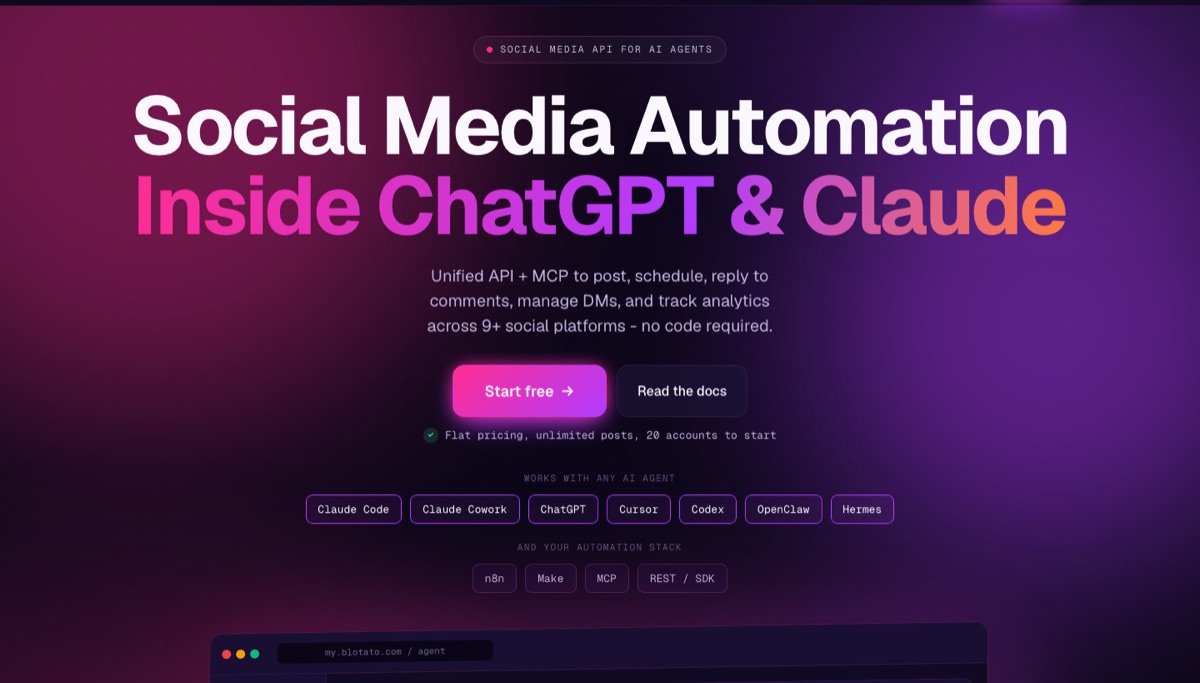
The web app is still there and still good, but the product is built API-first. I put it up against nine competing social media APIs at two different volumes.
In the web app, Blotato replaces your AI writer, your social scheduler and your repurposing tool with one system. Feed it a YouTube video, blog post, PDF or audio file. It spits out ready-to-publish posts tailored to each of the 9 platforms it supports: Instagram, TikTok, LinkedIn, Facebook, X, Threads, Bluesky, Pinterest and YouTube.
The founder matters here. Sabrina Ramonov built her audience teaching AI automation, and her tutorials are technical rather than surface-level hype. When someone who actually publishes at volume builds a publishing tool, I pay attention, because the design decisions tend to reflect real use rather than a feature checklist.

What Other Blotato Users Actually Say
My opinion is one data point, and given the affiliate and client relationship, weigh it accordingly. Here is what the independent review sites show.
On Trustpilot Blotato holds 4.8 out of 5 across more than 380 reviews. As of October 2026 it also held 4.8 on Capterra from 128 reviews, 4.7 on SourceForge from 73, and 4.6 on G2.
The praise clusters where you would expect: setup is fast, cross-posting works, and support is responsive. The criticism clusters where I landed too. Reviewers mention the UI needing polish, occasional sync issues with deleted posts, and needing to watch credit consumption so it does not surprise you. When independent reviewers and I flag the same weaknesses, that is probably the real shape of the product.
How Blotato's Pricing Stacks Up Against Competitors
Blotato sells three flat-priced plans, billed monthly by default, with no per-post fees. I put it head to head with seven other tools in my roundup of social media automation tools, and the plan you need comes down to how many accounts you connect and how many people you DM.
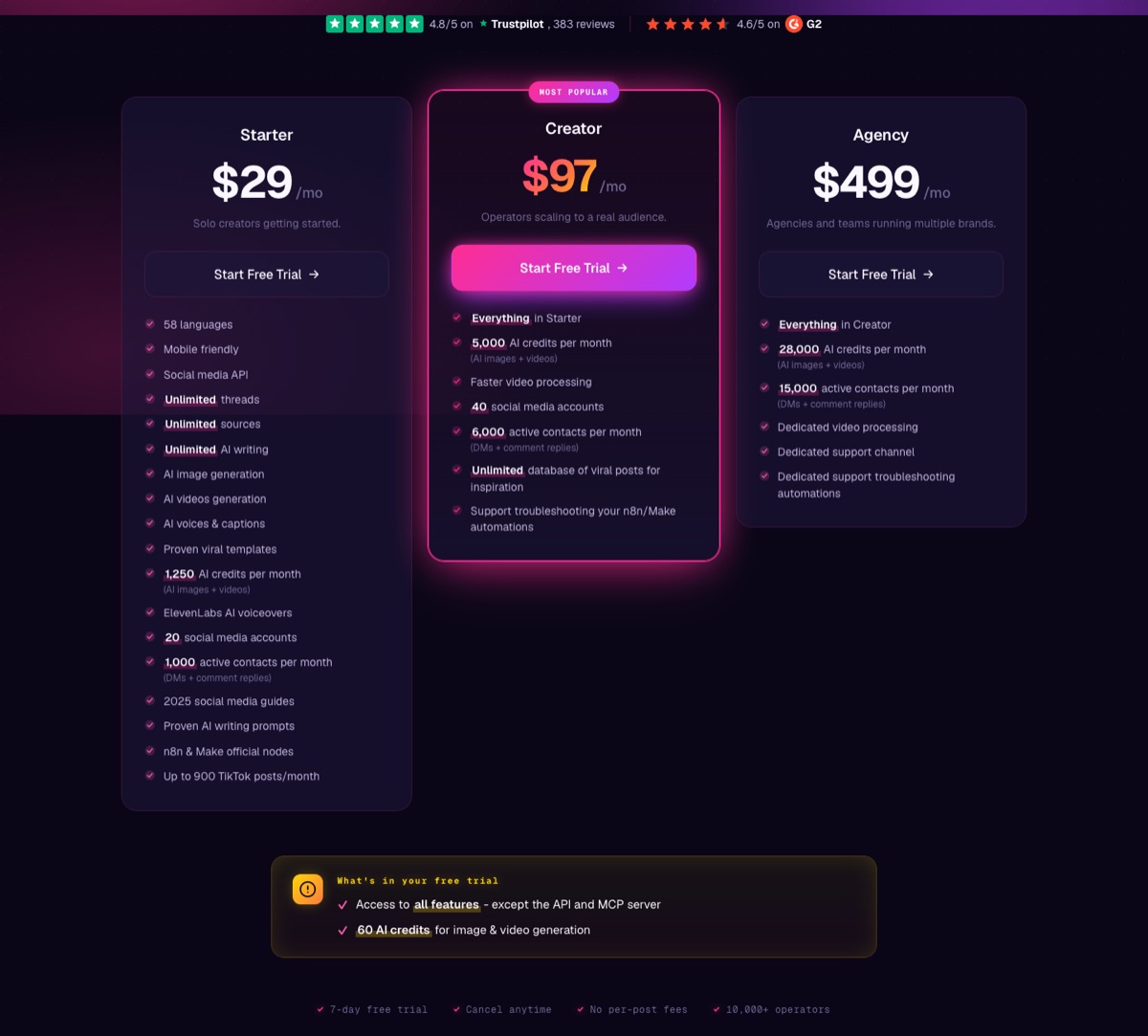
On the $29/month Starter tier you get unlimited AI writing, up to 20 connected social accounts, 1,250 AI credits a month for images and video, and full API and MCP access. Plenty of tools at this price will schedule posts for you. Very few hand you a full API on the entry plan.
Creator is $97/month with 40 accounts and 5,000 credits. Agency is $499/month with 28,000 credits, dedicated video processing and a dedicated support channel. Blotato's help center puts the Agency account limit at 100.
Four newer details are worth knowing before you pick:
- Yearly billing saves about 17%. You pay for 10 months and get 12. The pricing page only sells monthly, so you switch inside the billing portal under Settings.
- Credits roll over month to month, and extra packs cost $6 per 1,000. Writing, scheduling, API calls and ElevenLabs voiceovers do not use credits.
- DMs have a monthly cap. Starter covers 1,000 active contacts, Creator 6,000 and Agency 15,000. A contact is anyone you DM or reply to that month.
- Queued posts have a ceiling. Starter holds 200 scheduled posts at a time, Creator 1,000 and Agency 3,000. Posts you publish right away do not count.
At 20 accounts that is cheaper than Buffer or Sprout Social, and the price includes AI image and video generation. The Buffer section below has their numbers.
Blotato AI Features That Actually Matter
You can tell a tool was built by a practitioner when the features solve real problems instead of chasing feature-list vanity. Here is what stood out.
Content Repurposing Across Platforms
Drop in a YouTube video link and Blotato generates platform-specific posts for up to five channels at once. Each post adapts to the format and tone that performs on its respective platform. If you don't like the output, a built-in chatbot lets you refine posts in real time without starting over.

Brand Voice and AI Twin
Rather than making you pick a model, Blotato has you set up a Brand Kit and one or more Brand Voices. AI Twin then writes captions in your style based on those settings, so you are tuning the output to sound like you instead of guessing whether GPT or Claude writes a better hook today.
You can hold a separate voice for each brand. Under the hood Blotato routes to providers including OpenAI and Anthropic, and its docs confirm it does not train on your uploaded content.
Built-In Scheduling Across 20 Accounts
Instead of exporting posts to a separate scheduler, you publish directly from the same screen where you wrote them. Set up recurring time slots, assign platforms to each slot, and Blotato queues everything automatically. It's not the prettiest calendar view (more on that below), but having AI content creation and distribution in one place saves real time.

Analytics on Eight Platforms
Earlier versions of this review said Blotato wasn't there yet on analytics. It fixed most of that in July. You now get views, reach and engagement for posts you publish through Blotato, plus a Top Performing view that ranks your posts by the metric and date range you pick.
Coverage is X, Instagram, Facebook, Threads, Bluesky, TikTok, YouTube and Pinterest. LinkedIn returns no metrics yet, which stings if LinkedIn is your main channel. An AI agent can also pull analytics through the API or MCP (the MCP route covers fewer platforms today), so you can ask Claude which posts worked last month instead of opening a dashboard.
Comments, DMs and DM Automations
Since August, Blotato can read and reply to comments and DMs on Instagram and Facebook. It can also run keyword-triggered DM automations, the same "comment GUIDE and get the link" flow ManyChat is known for.
You can build an automation in the web app, or ask Claude or ChatGPT to build it: name the page, the trigger word and the message. The message can run up to 640 characters with up to three link buttons. Meta's own rules still apply, including one private reply per comment within 7 days and DM replies within 24 hours of the person's last message.
It only works on Instagram and Facebook, and every person you DM or reply to counts toward your plan's monthly active-contact cap. I compared it against seven dedicated tools in my roundup of the best tools for automating Instagram DMs.
Claude Code Automation via MCP
This is the setup I actually use most, and it is the reason Blotato stuck for me. Blotato ships an MCP server, so Claude Code can create and publish posts without me ever opening the dashboard. I walked through the whole build in this video.
The connection itself is straightforward. Inside Blotato you go to Settings, then API, and pick the MCP setup for your client: the Claude web app, Claude Desktop and Cowork, Claude Code, or other MCP clients.
I paste those instructions into Claude Code and let it wire up the connection. Expect a couple of troubleshooting questions rather than a clean one-shot.
Once it is connected, the workflow is just conversation. I point Claude Code at one of my own YouTube videos and ask for five posts each for X and LinkedIn, written against a skill file that holds my tone and caption rules. Blotato can scrape the YouTube transcript itself through the MCP, so I never copy and paste it between apps.
Publishing works the same way. I can tell it to post one straight to X and schedule another to LinkedIn for tomorrow at 1pm Central, and it does both.
When I tried that, Claude Code checked my Blotato calendar, spotted an existing post at that time, and asked me to pick a different slot instead of silently double-booking. I did not have to catch the conflict myself.
The more useful version is batch work. My editor drops finished short-form videos into a Google Drive folder, and I can ask Claude Code to read that folder, pull each transcript and write captions for every clip.
It splits them correctly too: one caption style for Instagram, TikTok and YouTube Shorts, another for X, LinkedIn and Threads. Reading Drive needs the Google Workspace CLI connected first, which is a separate setup step.
The MCP server has grown a lot since I started. Blotato's tools reference lists 35 tools as of October 2026, covering posts, scheduling, analytics, comments, DMs and automations.
ChatGPT Plugin and Claude Connector (No Code Needed)
If Claude Code sounds like too much, this is the November change that matters most. Blotato is now an official plugin in ChatGPT's Plugins directory and a listed connector in Claude's directory. You install it, sign in to your Blotato account, and start asking.
Before this, connecting ChatGPT meant eight steps to add a custom MCP server yourself. On Claude's Free plan, a hand-added Blotato connector also used up the one custom connector slot that plan allows. A directory listing removes both problems. From either chat you can schedule posts across all nine platforms, answer comments and DMs, read analytics and build DM automations.
On ChatGPT, Blotato's setup guide says the plugin works on ChatGPT's Free plan, though you still need a paid Blotato plan. OpenAI adds that plugin access depends on your plan, workspace, role and region, and Blotato notes that a company workspace may need an admin to allow it first.
Both need a paid Blotato plan. If you want to see how Blotato fits next to other add-ons, I ranked it in my list of the best Claude connectors.
Make.com Automation via API
This is where Blotato pulls ahead of beginner-focused tools. The starter plan includes API access plus official nodes for n8n and Make.com. I tested a workflow that monitors a Google Sheet for article URLs, processes them through OpenAI, and publishes finished posts across all connected accounts automatically.

The automation ran on the first attempt with zero errors across Facebook, Instagram, LinkedIn and X. That rarely happens with multi-platform workflows. If you want to build AI marketing agents that handle distribution, the starter tier is enough.
Blotato vs Upload-Post vs Zernio
These are the three tools people actually cross-shop when they want to publish to social platforms from code or from an AI agent. If open source is on your list too, I put Blotato head to head with Postiz, the self-hostable option, separately.
These tools bill for different things. Blotato and Zernio both count connected accounts, but Blotato sells them in flat tiers while Zernio bills each one. Upload-Post counts profiles, and one profile is one brand or client that can hold an account on each of its 22 networks.
| Blotato | Upload-Post | Zernio | |
|---|---|---|---|
| Entry price | $29/mo | $0 free tier, $24/mo Basic | First 2 accounts free |
| What it counts | Connected accounts | Profiles (one per brand) | Connected accounts |
| One brand on 9 networks | $29/mo | $24/mo | $42/mo |
| 20 accounts across 3 brands | $29/mo | $24/mo | $78/mo |
| 20 accounts across 10 brands | $29/mo | $39/mo | $78/mo |
| Free plan | No, 7-day trial only | Yes, 2 profiles, 10 uploads/mo, no TikTok | Yes, first 2 accounts |
| API and MCP on entry plan | Yes, paid plans only | Yes, including free tier | Yes |
| Platforms | 9 | 22 | 16 |
| AI content generation | Yes, text, images, video | AI Shorts captions, capped by plan | No |
Monthly list prices as of November 9, 2026. The 10-brand Upload-Post price is Basic plus its $15 five-profile add-on. Posting links on X costs $19/month extra on Upload-Post. Blotato and Upload-Post both get cheaper on yearly billing.
Blotato vs Upload-Post
I got this wrong in earlier versions of this review. I counted Upload-Post profiles as single accounts, which made it look expensive at 20 accounts. One Upload-Post profile holds one account on every network, so a creator with one to five brands fits on Basic at $24/month no matter how many networks they post to.
That makes Upload-Post the cheaper publishing pipe for most solo creators. It also has a real free plan (two profiles, 10 uploads a month, no card, no TikTok) and supports 22 platforms, including Discord, Telegram, Mastodon and WordPress that Blotato does not touch.
The difference is what comes with publishing. Upload-Post's AI writes titles, descriptions and hashtags for short videos. Blotato writes posts from long-form sources, generates images and video, and adds comment replies and DM automations on Instagram and Facebook.
If you just need distribution and rarely post links on X, buy Upload-Post. If you want the writing and visuals made for you, judge Blotato on output quality during the trial, because for one to five brands the $5 gap is not the deciding factor.
Blotato vs Zernio
Zernio's pay-per-account model is elegant. The first 2 accounts are free with full API access, which is a better on-ramp than a 7-day trial. It has also grown well past publishing: it now sells DMs across more channels than Blotato, plus comments, analytics and automation runs.
The catch is what happens as you grow. Zernio charges $6 per account for accounts 3 through 10 and $3 for 11 through 100. One brand on nine networks costs $42/month, and twenty accounts costs $78/month, against Blotato's flat $29. Zernio also does not generate content, so you still need something upstream writing the posts and making the visuals.
Pick Zernio if you are a developer with a couple of accounts, you already have content generation solved, or you need messaging on channels like WhatsApp or Telegram. Pick Blotato if you want the writing, the visuals and the publishing behind one flat bill. I tested Zernio properly and fact-checked its headline marketing claim in a full Zernio review.
Blotato vs Buffer and the Traditional Schedulers
Buffer, Hootsuite and Sprout Social are a different category, and comparing them on price alone misses the point. Buffer bills per channel, starting at $6 per channel per month with a lower rate past the tenth, so 20 accounts lands near $100/month.
Sprout Social now opens with an Essentials plan at $79 per seat per month on annual billing, and Standard is $199. Both Sprout plans cap you at five profiles.
If you want a polished calendar and approval workflows for a team of humans, Buffer and Sprout are more mature products. If you want an agent to create the posts and visuals, then publish them, Blotato is built around that job.
Buffer is the closest call, because it now ships its own API, MCP server and AI Assistant. I broke the two down properly in Blotato vs Buffer, including where Buffer is the better buy. If analytics are your deciding factor, my Blotato vs Metricool comparison goes deeper on reporting.
Where Blotato Still Needs Work
The scheduling calendar lacks visual clarity. When I loaded a full week of posts across four platforms, it was hard to scan what was going where. Dedicated tools like Hootsuite lay this out more cleanly. Blotato works, but you have to click around more than you should.
Analytics are new and only cover posts published through Blotato. If you need client-ready reports or deep competitor benchmarking, a dedicated analytics tool is still the better fit.
Comments and DMs stop at Instagram and Facebook. X, TikTok, LinkedIn and the rest have no comment or DM support. If DMs are your main channel, also watch the active-contact cap: 1,000 a month on Starter goes quickly if a post takes off.
If you plan to generate lots of images or videos, watch your credit balance. Writing posts costs nothing on any plan, but every AI-generated image or video draws down your monthly allotment. Rollover helps, but heavy multimedia users on Starter can still run dry in the first couple of weeks.

The platform pushes faceless AI videos hard, with templates, sample clips, and a built-in video editor. The editing tools work, but I'm skeptical about whether faceless videos drive real conversions. They rack up views. Whether those views turn into revenue is a different question. Treat Blotato as a writing and scheduling tool first, video tool second.
Who Gets the Most Value from Blotato
If you already work inside ChatGPT or Claude, Blotato now installs straight from both directories, so you can run social media from the chat you already use. The same goes for anyone using Make.com, n8n or Claude Code, where API access on the starter plan opens workflows that tools twice the price don't support.
Solo creators juggling four or more social accounts will save the most time. Same goes for small business owners who need to post consistently but can't afford a full marketing hire. If your DMs are mostly comment-keyword follow-ups, the built-in automations may cover what you pay ManyChat for.
Skip it if you only need a cheap publishing pipe for content you already make, since Upload-Post does that for less. Skip it too if LinkedIn analytics or enterprise reporting are must-haves.
My take: if you are staying in the web app, start the 7-day free trial and run your actual content through it. The card is required and you are charged when the trial ends unless you cancel, so treat it as a paid month you can back out of rather than a free sample.
If you are here for the API, MCP, ChatGPT plugin or Claude connector, skip the trial math entirely. Generating a key starts billing on day one, so just buy the first month at $29 and judge it on that.
Final Notes from Ryan
I have used Blotato since early 2025, and it is still in my toolkit. Most AI tools I review get uninstalled within a week. This one stuck because it turns one piece of content into platform-ready posts without bouncing between five apps.
The 2026 launches made it harder to replace. Comments, DMs and analytics close the loop after a post goes live.
Blotato says the Claude and ChatGPT directory listings cut setup down to install and sign in, which would matter most for non-technical users. Claude Code over MCP is how I use Blotato most, but the one-click directory installs are still on my list to test.
The calendar still needs polish, and the newer DM and analytics features are worth testing on your own account before you rely on them. For my own publishing, it is still the tool I open first.
Blotato Review FAQs
Is Blotato worth it?
For most creators who want one tool to write, publish and follow up on posts, yes. At $29 a month you get AI writing, 20 accounts, the API and MCP, plus comment and DM tools on Instagram and Facebook. It is not worth it if you only need to publish content you already make, because Upload-Post does that for less.
Is Blotato free?
No. There is a 7-day free trial that requires a card and converts to a paid subscription unless you cancel. It includes every web app feature and 60 AI credits, but not the API or MCP server, so the ChatGPT plugin and Claude connector need a paid plan. If a free tier is a requirement, Upload-Post and Zernio both have one.
How much does Blotato cost per month?
Starter is $29/month for 20 social accounts and 1,250 AI credits. Creator is $97/month for 40 accounts and 5,000 credits. Agency is $499/month for 28,000 credits and up to 100 accounts. Yearly billing saves about 17%, and you switch to it in the billing portal rather than on the pricing page.
Does Blotato work with ChatGPT and Claude?
Yes. Since November 2026, Blotato is an official plugin in ChatGPT's Plugins directory and a listed connector in Claude's directory. Claude Code, Cursor, Codex and other MCP clients connect through the same MCP server. All of them need a paid Blotato plan, because the free trial excludes API and MCP access.
Can Blotato automate Instagram DMs?
Yes, on Instagram and Facebook. A keyword in a comment or message triggers a DM with up to three link buttons, and your AI agent can build the automation for you. Each person you DM or reply to counts toward a monthly active-contact cap: 1,000 on Starter, 6,000 on Creator and 15,000 on Agency.
Is Blotato cheaper than Upload-Post and Zernio?
It depends on account count. Zernio charges per account, so it is cheaper below 7 accounts, at 21 to 26, and at 41 or more. Blotato is cheaper at 7 to 20 and 27 to 40. Upload-Post is usually cheaper than both, because one profile covers a brand on every network, so Basic at $24 fits most solo creators. Blotato's price also covers content creation, comment replies and DM automations.
Disclosure: some links in this post are affiliate links, specifically Blotato. If you buy through them I may earn a commission at no extra cost to you. Blotato is also a client of mine. Prices and features verified November 9, 2026. Full disclosure.