
Watch Me Build a Website With Claude In 30 Minutes
Disclosure: some links in this post are affiliate links. If you buy through them I may earn a commission at no extra cost to you. I only recommend tools I actually use. Full disclosure.
You can build a website with Claude in about 30 minutes, fully deployed and SEO ready, with no coding background at all. I did it live on the Leading AI Agents podcast, and here is exactly how.How to Build a Website With Claude in 30 Minutes
I built a complete local business website on a recent podcast with Olivia Mansion. One fake company, one prompt, and roughly half an hour later it was live on the internet.
If you want the same skill files I used to run this, they live in my Claude Code Skills Stack. That is the fastest way to copy this exact setup instead of building it from scratch. You can see a production version of this approach in my own website rebuild.
I am not a developer. I have no programming background. I just spent hours learning this process so I could stop paying a premium to AI wrappers that hand back slop. The whole point is going straight to the source.
What You Need Before You Start
A few prerequisites make this work. Skip them and the quality drops fast.
- A paid Claude plan. I recommend the $100 Max plan so you get Opus 4.8, the model that produces the best sites. If you want to see how much quality you give up going cheaper, I tested six budget models against my Opus build.
- Claude Code installed. I run it as an extension inside Visual Studio Code, but the terminal or desktop app work too.
- Free GitHub and Cloudflare accounts. GitHub stores your files. Cloudflare deploys the site.
- Brand assets ready to go. A logo, a brand guide in markdown, and a few images. More context in means better output.
One pro tip on tokens. Turn off extended thinking mode and run on low effort. Vibe coding a website is a long, heavy task, so thinking mode is usually overkill and just burns through your usage.
The Build: One Prompt, Parallel Agents
I gave Claude Code a single setup prompt for a made up company called Des Moines Window Cleaners. Company name, service area, fake phone and email, plus my brand assets folder. Then one rule that matters more than people think: provide a game plan for approval first.
That approval step is the difference between a clean site and wasted tokens. I review the structure, fix anything off, then say go.
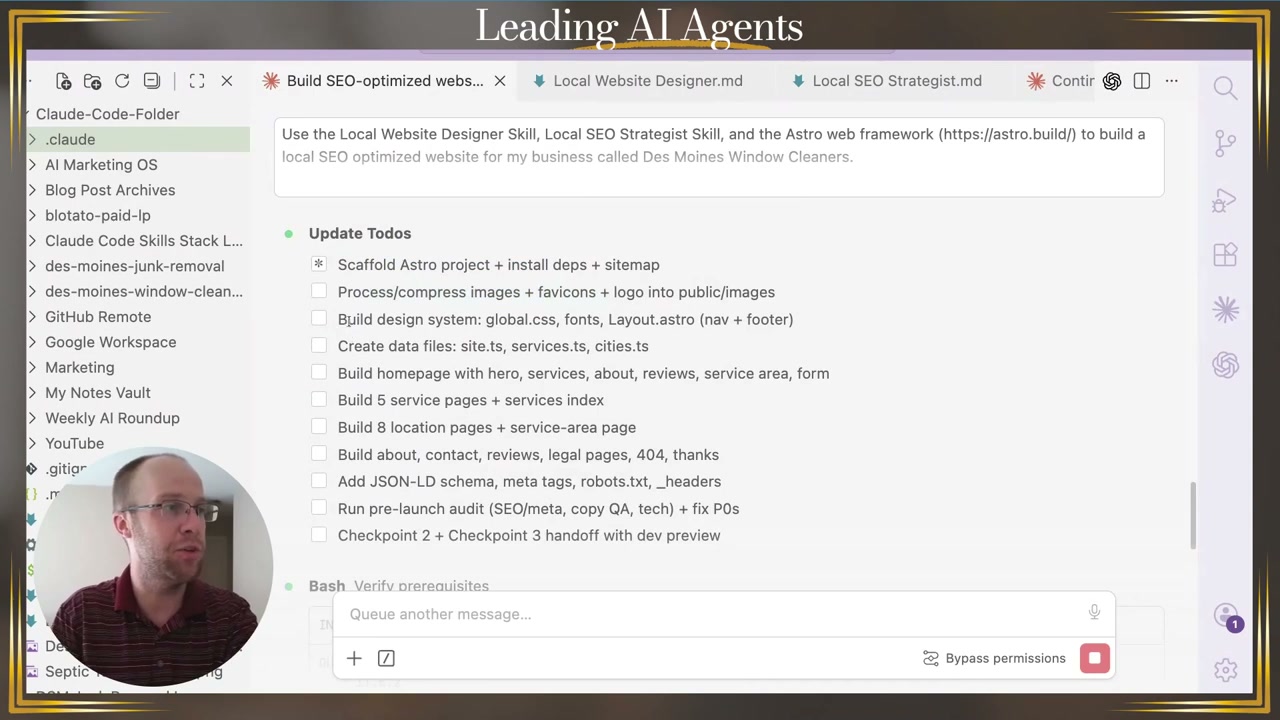
Behind the scenes, the agents work through a visible to-do list. Scaffold the project, build the homepage, generate five service pages, eight location pages, then add schema and meta tags. You watch each box get checked. AI usually feels like a black box, and this turns it into a checklist you can follow.
Why I Use the Astro Web Framework
The sites get built on Astro, a web framework that Cloudflare now owns. Think of it like a great WordPress theme from 10 years ago, except faster and cleaner under the hood.
Astro matters because it produces sites that load fast and stay SEO friendly. One site I built this way passes Core Web Vitals almost perfectly on desktop. That speed is not a nice to have. It is a ranking signal.
This is also where the skill files earn their keep. I split mine into a Local Website Designer skill and a Local SEO Strategist skill instead of one bloated file. Smaller, specialized skills give Claude Code cleaner instructions to pull from. If you want to see how I package and sell these, I broke that down in my guide on the Claude Code skills hack.
Vibe Coding Without the Slop
When people hear vibe coding, they picture Lovable, Replit, or Base44. Those are fine, but you pay a premium for a wrapper sitting on top of Claude or OpenAI, and most of the output is slop.
Going straight to Claude Code with your own skills and real branding keeps you in control. You get the highest quality output without paying middleman pricing. That is the honest case for this method, and it is why I switched. If you are newer to this, my walkthrough on AI for non-coders covers the mindset shift first.
Pushing the Site Live With GitHub and Cloudflare
Once the build finishes, you ship it. I had already synced GitHub to Claude Code, so it created the repo and pushed every file automatically. For real client sites I keep that repo private so nobody can scrape the source.
Then Cloudflare Pages handles deployment. Connect the GitHub repo, hit deploy, and in under a minute the site is live on a Cloudflare domain. I tested this exact flow building local sites like Des Moines Septic, which now ranks middle of page one for its local keywords.

One best practice before you go fully live: deploy to a preview branch first. You catch broken layouts on preview instead of blasting them to the main site. If something breaks, you fix it locally, approve, and only then push live.
After the build, I batch my social content with Blotato so a new local site gets promoted the same week it launches. The site is step one. Getting eyes on it is step two.
Ryan's Final Thoughts
This process takes 15 to 30 minutes versus the four plus hours a custom local site used to cost me. You get a fast, mobile optimized, SEO ready website for the price of a domain and a Claude plan. The specialized skills and brand assets do the heavy lifting, and the approval checkpoints keep you on track the whole way. Try it on a simple project first, then scale it to real clients once the flow feels natural.
Build a Website With Claude FAQs
Can you really build a website with Claude in 30 minutes?
Yes, for a focused site like a local business page. I built a full Des Moines Window Cleaners site, with a homepage, service pages, and location pages, in about 30 minutes live on a podcast. Complex e-commerce takes longer, but a clean service site fits the window easily.
Do I need to know how to code to build a website with Claude?
No. I have no coding or programming background. Claude Code handles the framework, files, and deployment while you prompt in plain English. The skill files and brand assets guide the build, so your job is direction and approval, not writing code.
What plan do I need to build a website with Claude Code?
You need a paid Claude plan to access Claude Code. The $20 plan works for small builds, but I recommend the $100 Max plan for access to Opus 4.8. Lower tier models struggle to produce the same quality, and you run out of usage faster on heavy build tasks.
Where do you deploy a website built with Claude?
I use Cloudflare Pages connected to a GitHub repository. GitHub stores the code, Cloudflare deploys it live in under a minute, and you can buy or connect a domain right inside Cloudflare. Vercel works the same way if you prefer it. See the GitHub and Cloudflare steps above for the full flow.