
7 Best Zernio Alternatives for Marketers (No API Needed)
Zernio's own comparison pages grade its dashboard "Basic" and list its AI assistant as "No." If you signed up for the calendar rather than the API, the Zernio alternatives below are compared on what a marketer actually needs from one: client approvals, AI writing help and an inbox.
What Zernio's Dashboard Gives a Marketer (and What It Leaves Out)
I signed up for Zernio, connected the free accounts and went through the dashboard when I fact-checked it for my Zernio review. The free tier is real, and looking around costs nothing.
The API is the product, though. Zernio describes itself as "a social media scheduling and messaging API," and its pricing FAQ says it is "built for developers and teams with technical resources."
For a marketer, the features page lists a drag-and-drop calendar and unlimited team members. The pricing page adds unlimited posts and an inbox for comments and DMs on each connected account, on the networks Zernio supports for each.
What is missing, going by Zernio's own pages:
- AI writing. Its Buffer comparison page marks its own AI assistant "No" and its own UI dashboard "Basic."
- Client approvals. I could not find an approval workflow anywhere in its features or docs.
- Client workspaces and white-label reports. Its white-label option lets a developer's own users connect their accounts, which does nothing for a client report.

Billing is per connected account. The first 2 are free, accounts 3 through 10 cost $6 each, and 11 through 100 cost $3 each, so ten accounts is $48 a month and twenty is $78. Several tools below also count accounts or channels, so the unit matters more than the starting price.
Zernio Alternatives at a Glance
Prices were read off each vendor's live pricing page on October 23, 2026, with monthly billing selected. Metricool, Planable, Buffer and Vista Social all open on yearly billing, which prints a lower number with a "/month" suffix.
| Tool | Best for | Starts at (monthly) | Bills per | Client approves without a login | Inbox |
|---|---|---|---|---|---|
| SocialPilot | Small agencies that need client sign-off | $30/mo | Plan, capped by accounts and users | Yes, on Premium ($100/mo) | From Standard ($50/mo) |
| Metricool | Client reporting on a budget | Free, then $25/mo | Brand | Yes, on Advanced ($67/mo), by emailed link | Comments and DMs, every plan |
| Planable | Clients who read every caption | $39 per workspace | Client workspace | No, clients need a free Approver account | $9 per workspace add-on |
| Blotato | Solo marketers who want posts written | $29/mo | Plan, 20 accounts on Starter | No approval workflow | Instagram and Facebook only |
| Buffer | A client team that posts for itself | Free, then $6 per channel | Channel | No, approvals need Team and a client login | Comments only, every plan |
| Vista Social | Agencies answering client DMs daily | $99/mo | Plan, capped by profiles and users | Yes, on Advanced ($199/mo), by shared calendar | Comments, DMs and mentions, every plan |
| Cloud Campaign | A branded client portal | $49/mo | Client workspace | Yes, every plan (branded links from Team) | Every plan, with AI-drafted replies |
Best Zernio Alternatives for Marketing Teams
These are ranked by fit for a marketer or small agency leaving Zernio's dashboard, weighing client approvals, AI writing help, the inbox and what a ten-client roster costs. SocialPilot leads because Premium is the lowest-priced plan here that bundles login-free client approvals, white-label reports and an inbox. Planable ranks third on approval depth, a Required mode plus free approver accounts, even though it is the priciest option here at ten clients. Blotato sits at four as the pick for a solo marketer running their own brands, where no client signs off. Cloud Campaign checks every column in the table but lands seventh, because ten clients on it cost roughly three times SocialPilot Premium.
I have used three of them myself, Metricool, Blotato and Buffer. The other four are a read of their pricing pages and help docs, and each card says which kind it is.
1. SocialPilot (Best for Small Agencies That Need Client Sign-Off)
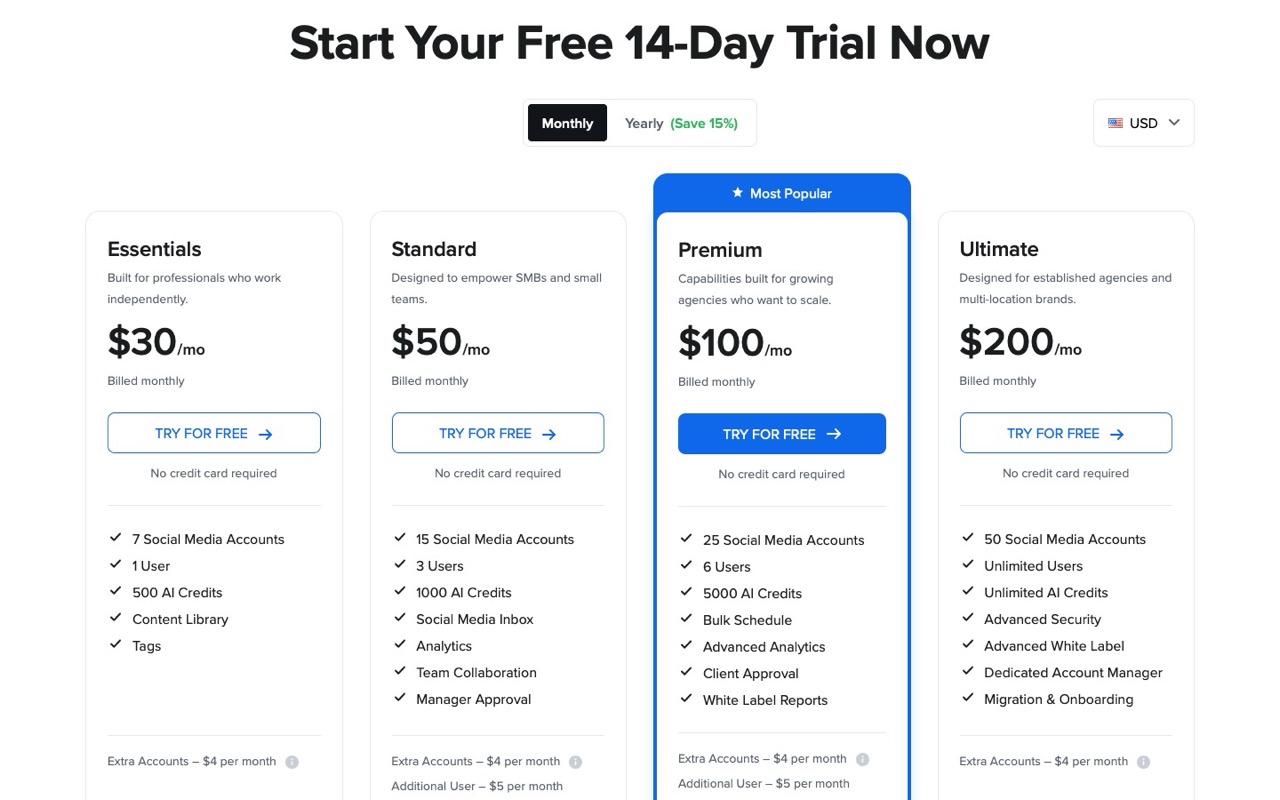
SocialPilot puts the agency basics into one mid-priced plan. Everything here comes from its plans page and feature docs, since I have not run it.
Pros:
- Premium covers 25 accounts, 6 users and unlimited client seats for $100 a month
- Its approvals page says clients can review the calendar and approve "without having to login to the app"
- White-label reports on Premium, so the monthly PDF goes out under your agency's name
Cons:
- Client approval starts at Premium, and Standard only has internal manager approval
- No social inbox on the $30 Essentials plan
- Premium caps at 25 accounts, so ten clients with three profiles each need extra accounts at $4 apiece
Best for: An agency with five to ten clients who approve posts before anything goes live.
Pricing: Essentials $30/mo (7 accounts, 1 user, 500 AI credits), Standard $50, Premium $100 (25 accounts, 6 users, 5,000 AI credits), Ultimate $200. Extra accounts $4 each. Monthly billing, with yearly about 15% cheaper.
Free trial: 14 days, no credit card required.
Bottom line: Premium is the plan to price. Client approval, white-label reports and unlimited client seats arrive together at $100, and the lower tiers lack the client step.
2. Metricool (Best for Client Reporting on a Budget)
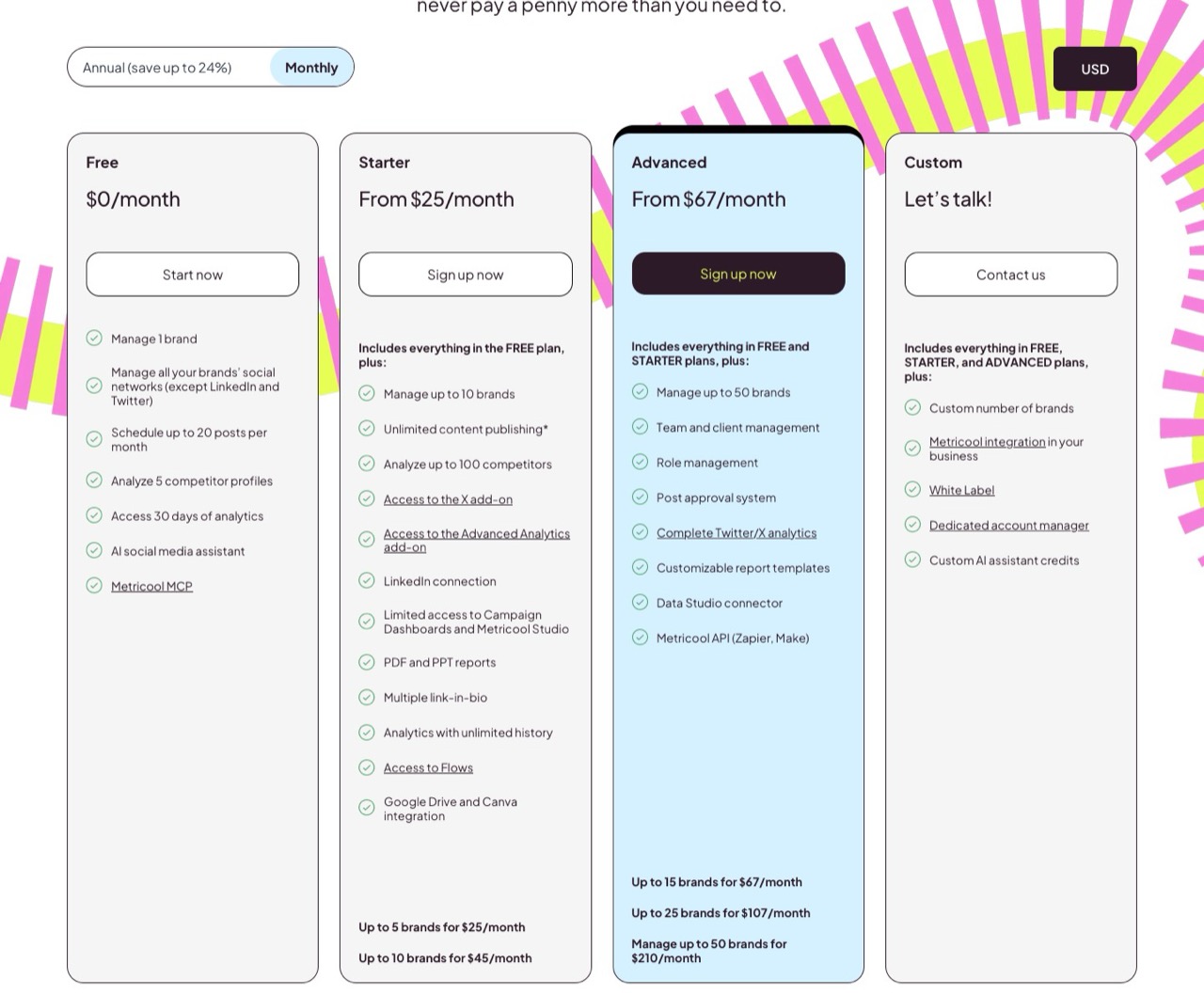
I set up a Metricool account, connected profiles and wired its MCP server into Claude for my Blotato comparison, so I have had hands on it for weeks. Its plans lean on analytics, with PDF and PowerPoint reports from Starter up.
The unit is the brand. One brand holds a profile on each network, so 15 brands can mean far more than 15 accounts.
Pros:
- A free plan for 1 brand, though it leaves out LinkedIn and X
- Advanced adds a post approval system, and outside reviewers approve by email without a Metricool account
- An inbox for comments and DMs on every plan
Cons:
- Approvals and client management start at Advanced, not Starter
- White label is on the Custom plan only
- AI captions run on a small credit allowance, 35 per brand a month on Advanced, and X needs a paid add-on
Best for: A freelancer or small agency whose clients judge the work by the monthly numbers.
Pricing: Free (1 brand, 20 posts a month). Starter from $25/mo for 5 brands or $45 for 10. Advanced from $67/mo for 15 brands, $107 for 25, $210 for 50. Monthly billing, with yearly up to 24% cheaper.
Free trial: No standard trial. The free plan is the test drive.
Bottom line: With one brand per client, $67 covers ten to fifteen clients with login-free approval links, the lowest price on this list for that job.
3. Planable (Best for Clients Who Read Every Caption)
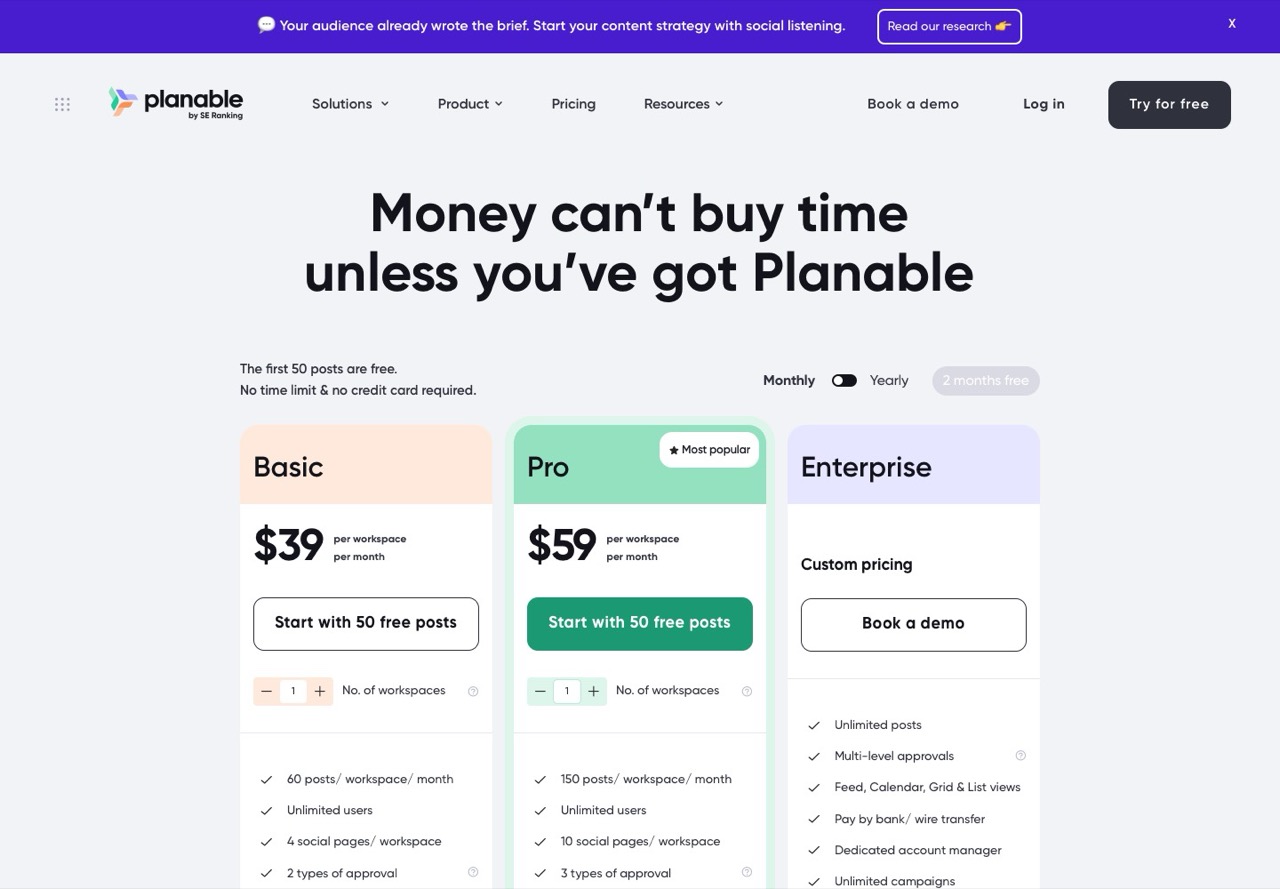
Planable is built around approvals, and the scheduling sits on top. My read comes from its pricing file and its own approvals guide, not from running client work through it.
Pros:
- Pro adds a Required approval mode, so once it is switched on, nothing publishes until someone signs off
- Unlimited users on every plan, with no per-seat fee
- AI post writing and rewriting on every plan, and the first 50 posts are free with no time limit
Cons:
- Its guide says public share links "allow viewing and commenting, but not approving," so each client approver needs an account (free)
- Per-workspace billing makes ten clients on Pro $590 a month before the volume discount it offers from 5 workspaces
- The inbox is a $9 per workspace add-on
Best for: Agencies whose clients want to read and approve every post.
Pricing: Basic $39 per workspace/mo, Pro $59 per workspace/mo. Add-ons: inbox $9, analytics $14 per workspace. Monthly billing.
Free trial: 50 free posts, no card.
Bottom line: Made for the client who reads every caption. The per-workspace bill suits a short roster of high-touch accounts better than a long one.
4. Blotato (Best for Solo Marketers Who Want the Posts Written)
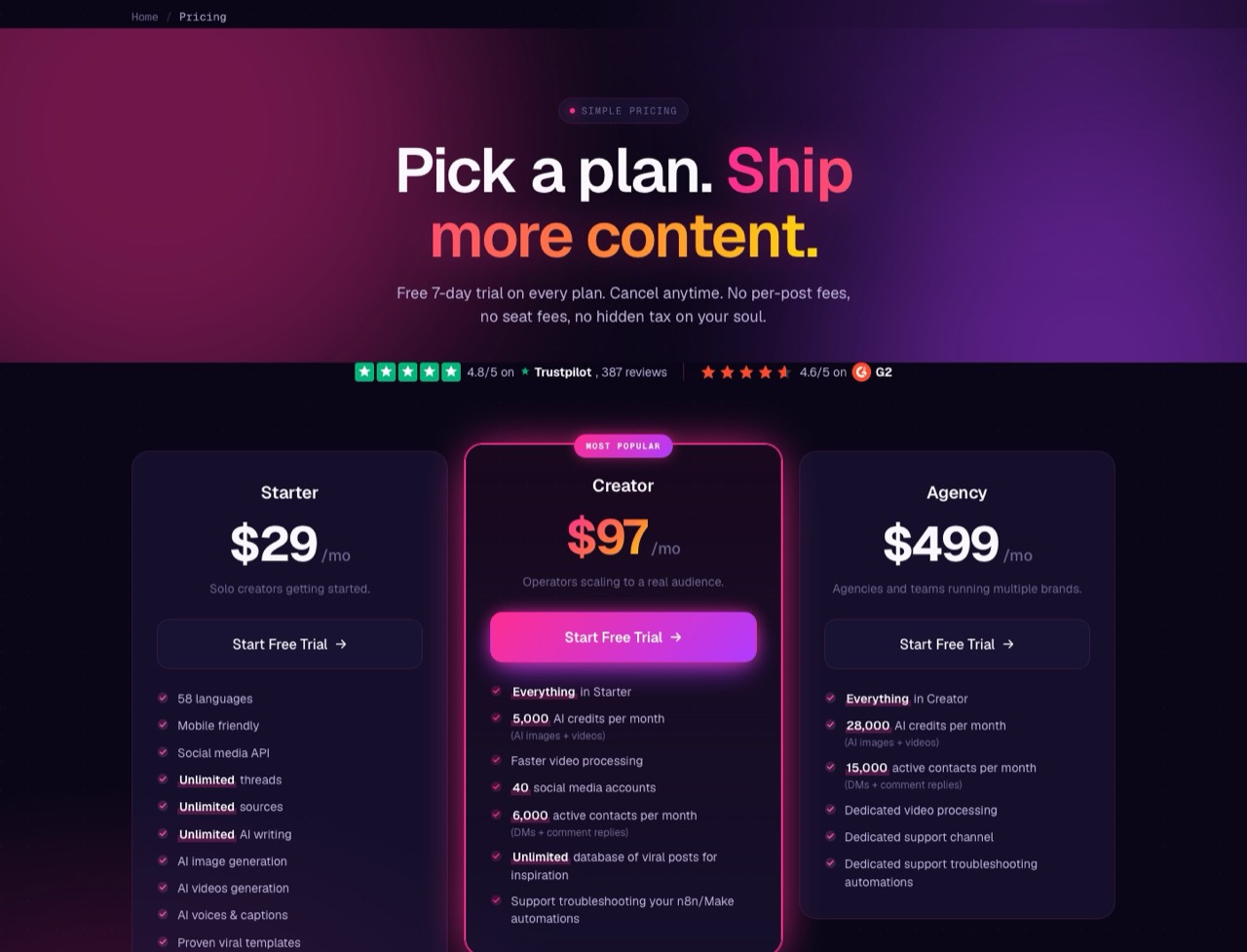
Blotato is the tool I use every day, and the long version is in my Blotato review.
It skips the approval layer and puts its weight on creating the post. Images and video run on monthly credits, and posts schedule to 9 platforms from one flat plan.
Pros:
- One flat plan covers 20 connected accounts for $29 a month
- Unlimited AI writing, with image and video generation on monthly credits
- An inbox for Instagram and Facebook comments and DMs, plus DM automation on both
Cons:
- No approval workflow, so client sign-off has to happen somewhere else
- One user per account, so teammates cannot get their own login
- No free plan, and the 7-day trial needs a card
Best for: A solo marketer or creator running their own brands, where writing is the bottleneck.
Pricing: Starter $29/mo (20 accounts), Creator $97 (40), Agency $499 (100). Monthly billing, with yearly about 17% cheaper through the billing portal.
Free trial: 7 days with 60 AI credits, card required.
Bottom line: The pick when nobody else needs to approve the post and you would rather not write it yourself. Once a client wants sign-off, look at the top three.
5. Buffer (Best for a Client Team That Posts for Itself)
I have used Buffer, though my own publishing runs elsewhere. It was also one of the two schedulers named most often for non-technical teams in the AI answers I checked while researching this post.
Pros:
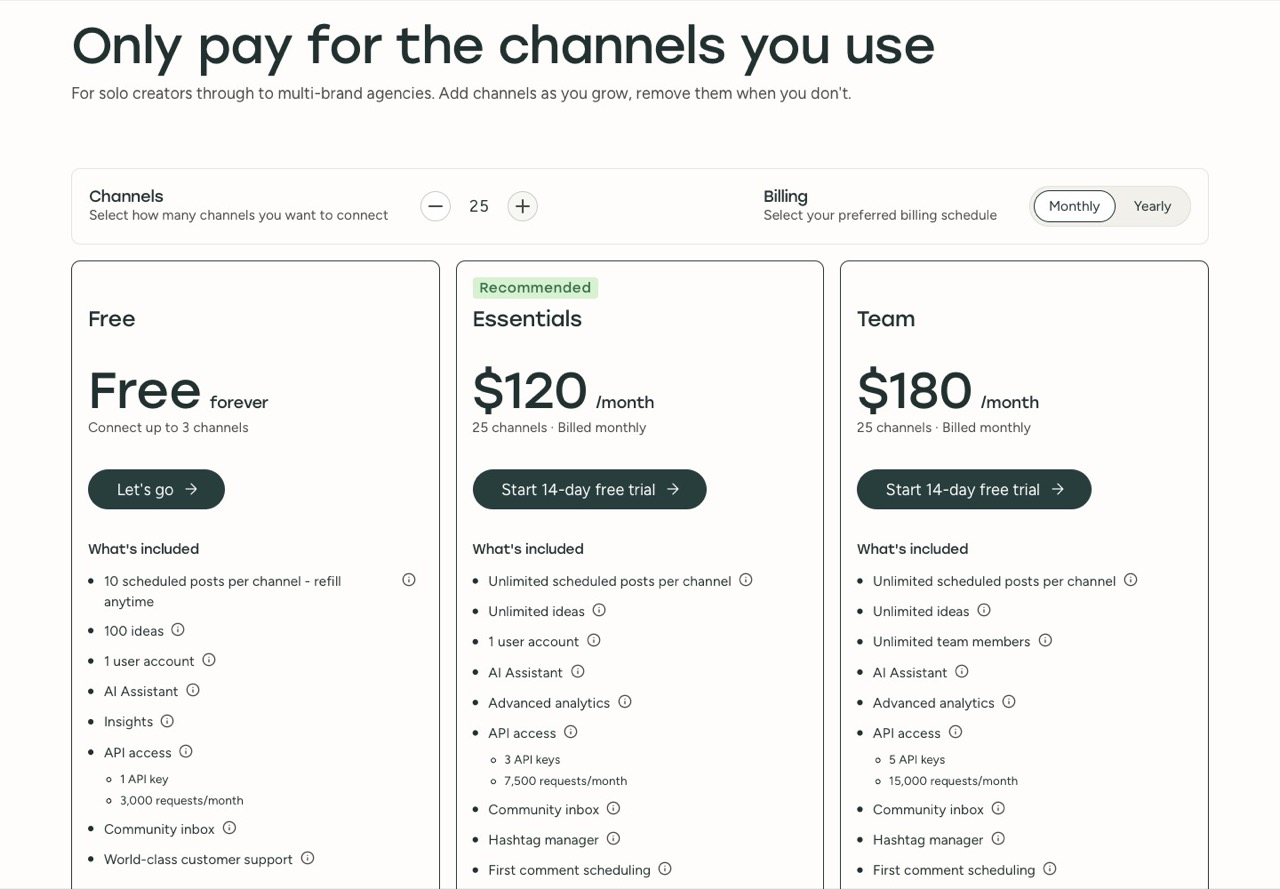
- Free for 3 channels, with 10 scheduled posts on each
- Its AI Assistant comes with every plan, Free included
- Team adds approval workflows and unlimited team members
Cons:
- Approvals need the Team plan and a Buffer login for the client. A June 2026 Buffer post called guest access "one of the next major releases on the roadmap"
- The community inbox handles comments, and the pricing page lists no DM inbox
- Team includes branded reports but no white label
Best for: A client whose own staff will log in and post.
Pricing: Free (3 channels). Essentials $6 per channel per month. Team $12 per channel for the first 10, then $4 each through 25, so 10 channels is $120 and 25 is $180. Monthly billing.
Free trial: 14 days on paid plans, plus the free plan.
Bottom line: Good for a client team that runs its own posting. Until guest access ships, every approver needs a Buffer login.
6. Vista Social (Best for Agencies Answering Client DMs Daily)
If your team lives in the inbox, Vista Social puts one on every plan for comments, DMs and mentions. I have not used it, so this card leans on its pricing page and the company's own write-up of the approval feature.
Pros:
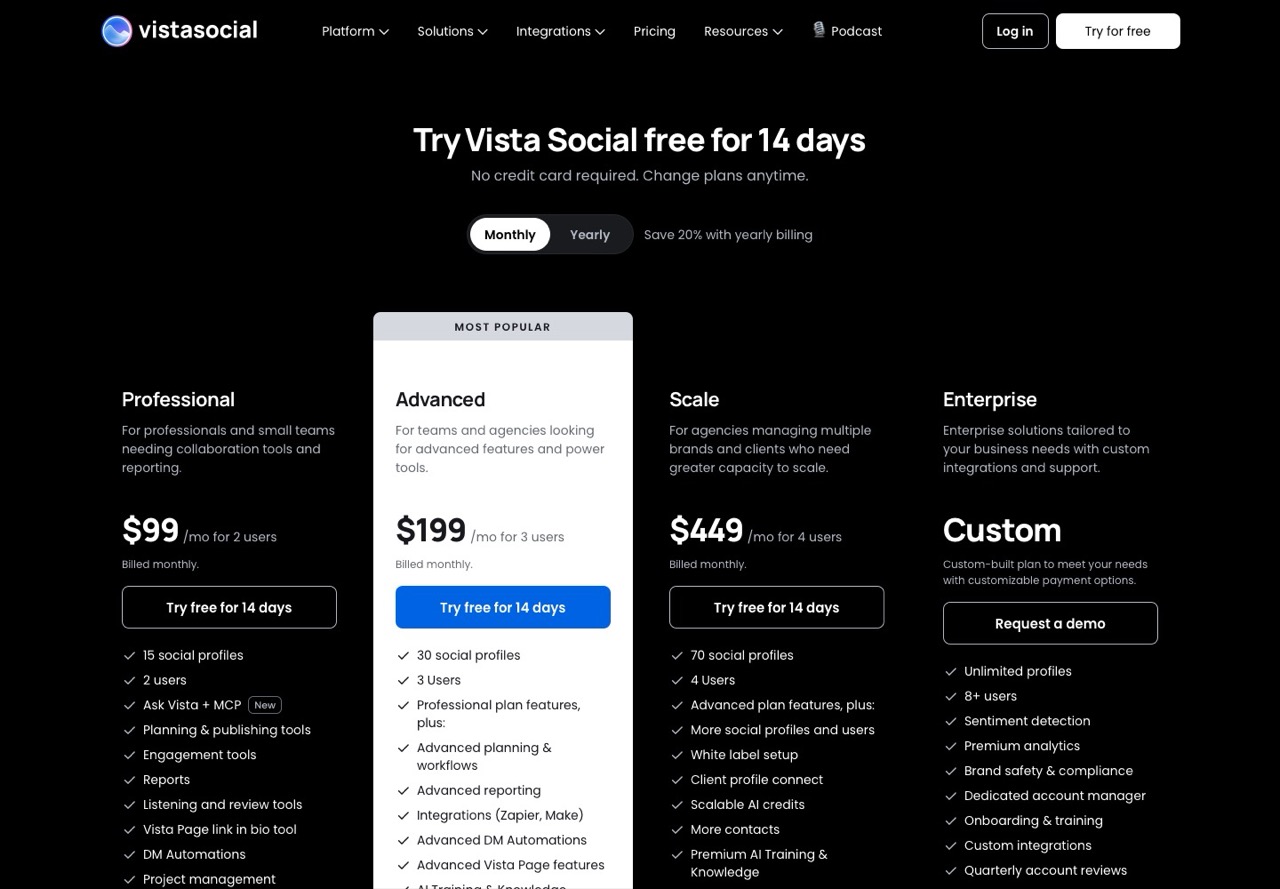
- The social inbox is on every plan, Professional included
- Advanced adds multi-stage approvals and 10 shared calendars, which clients can approve through without logging in
- AI caption credits on every plan, 1,000 a month on Professional
Cons:
- The pricing cards list 2 users on Professional and 3 on Advanced, while Vista's FAQ gives higher numbers, so confirm before you buy
- The pricing card puts white label on Scale at $449, while Vista's own AI-facing site file says Professional and Advanced
- No free plan
Best for: Agencies whose clients get DMs and comments that someone has to answer every day.
Pricing: Professional $99/mo (15 profiles), Advanced $199 (30 profiles), Scale $449 (70 profiles). Monthly billing.
Free trial: 14 days, no credit card required.
Bottom line: Choose it for the inbox, and budget for Advanced if clients approve, since shared calendars start there.
7. Cloud Campaign (Best for a Branded Client Portal)
The agency focus shows in the pricing unit at Cloud Campaign, which bills per client workspace. This one is a desk read too, built from its plans page and help answers.
Pros:
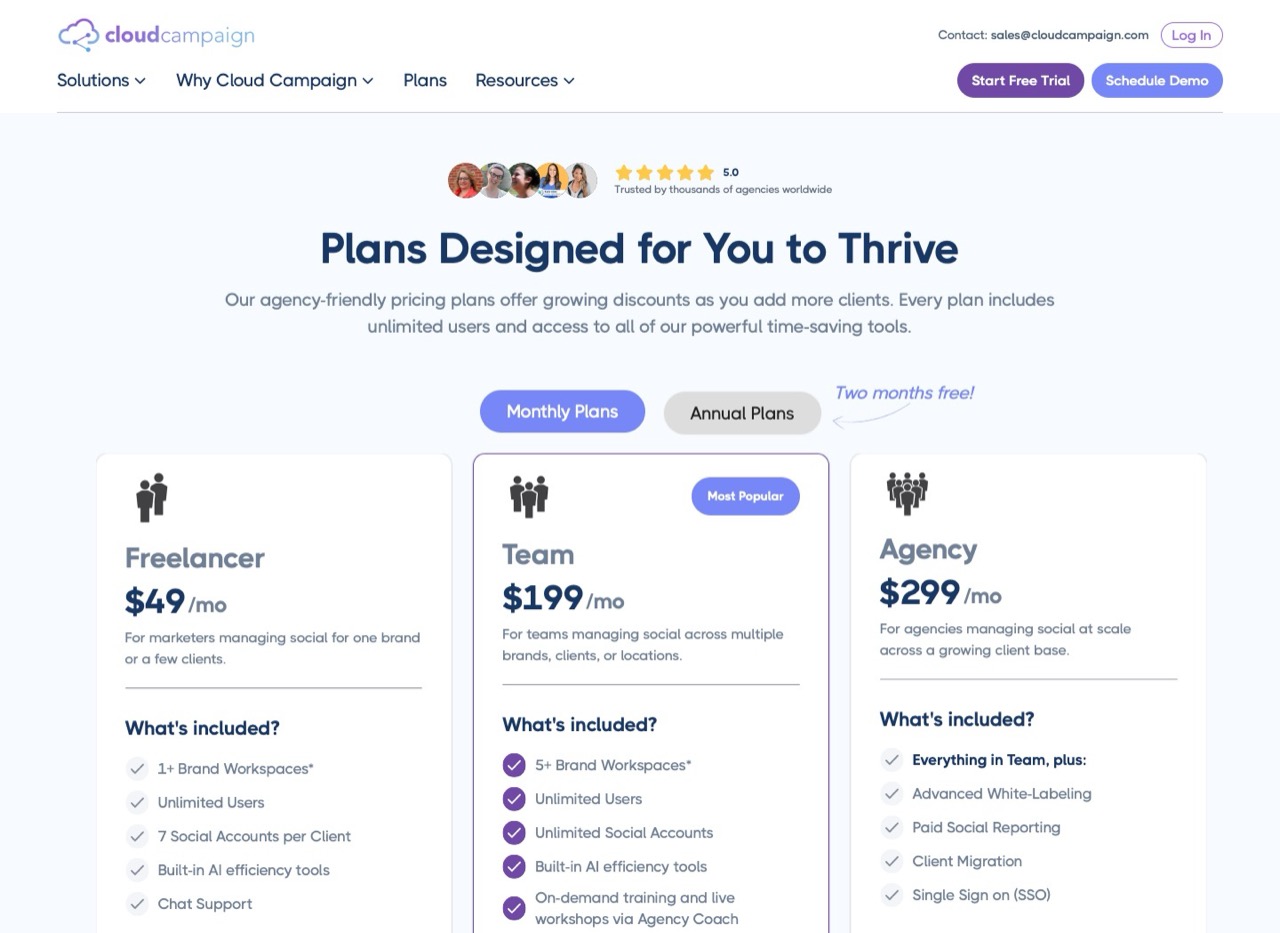
- No-login client approvals on every plan, with your branding on the links from Team up
- Unlimited users on every plan, and unlimited social accounts from Team
- Unlimited AI caption writing, plus image generation and AI-drafted inbox replies, on every plan
Cons:
- Freelancer holds one brand workspace, then each extra is $49
- White label starts at Team, $199 a month
- Ten clients on Team lands in the "mid-$300s" a month, by Cloud Campaign's own math
Best for: Agencies that want clients to see the agency's brand at every step.
Pricing: Freelancer $49/mo (1 workspace), Team $199 (5 workspaces, standard white label), Agency $299. Extra workspaces from $29 on Team. Monthly billing, with yearly priced as 12 months for 10.
Free trial: 14 days. I could not confirm whether it asks for a card.
Bottom line: Price it at your real client count before falling for the portal. Team plus five extra workspaces is roughly $344 a month.
What About Hootsuite and Sprout Social?
Both came up in the AI answers I checked for this post, and both are capable suites. Hootsuite and Sprout Social also price per seat, so every teammate you add raises the bill on top of the plan. For a small agency coming off a per-account Zernio bill, that billing model is the reason I left them off.
Building on Zernio's API Instead?
Then this is the wrong list. Every tool above is a dashboard first, and swapping an API you have coded against for a calendar would be a step sideways. If you publish from an app or an AI agent, I compared the developer options in my social media API breakdown.
Questions to Ask Before You Move a Client Over
I run through these before recommending any scheduler to a client.
Will the client approve posts, and will they make an account to do it? Every extra login is one more reason approvals arrive late.
Who writes the first draft? If you do, compare how much AI writing each plan includes, from a small monthly credit allowance to unlimited. If the client sends finished copy, it barely matters.
Which messages matter? Instagram comments, or DMs on every network you manage? Check the inbox column against the networks your clients actually use.
What does the bill count? Accounts, channels, brands or workspaces. Price your roster plus the next two clients in that unit before comparing starting prices.
Where I'd Start With Ten Clients
Say ten clients, two or three profiles each, and every one of them approves posts. Going by their docs, I would price SocialPilot Premium first ($100 for 25 accounts, $120 at 30) against Metricool Advanced ($67 with one brand per client). If answering DMs is the daily job, add Vista Social Advanced to that shortlist. If it is just you posting for your own brands, start with Blotato and skip the approval question.
Zernio Alternatives FAQs
Does Zernio have AI writing?
Not in its dashboard, going by Zernio's own comparison pages, which list its AI assistant as "No." All seven alternatives here include some AI writing help, from Buffer's AI Assistant on its free plan to Cloud Campaign's caption writer on every plan. Zernio does run an MCP server, so an AI agent you already use can post through it, which is a developer route rather than a writing feature.
Which Zernio alternative lets clients approve posts without logging in?
SocialPilot on Premium, Metricool on Advanced through an emailed reviewer link, Vista Social on Advanced through a shared calendar, and Cloud Campaign on every plan. Planable approvers need a free account, and Buffer approvers need a Buffer login until its planned guest access ships. Metricool is the only one of those four I have used, and I have not tested its reviewer link, so all four answers come from each vendor's documentation.
Is there a free Zernio alternative with a visual calendar?
Buffer is free for 3 channels with 10 scheduled posts on each. Metricool is free for 1 brand and 20 posts a month, though not on LinkedIn or X. Planable gives 50 free posts with no time limit. Zernio's own free tier also covers 2 connected accounts with no card, which is enough if you run one small brand.
Is Zernio good for agencies?
It suits agencies with a developer on staff. Zernio bills per connected account, so 20 accounts cost $78 a month, and its dashboard covers scheduling with a drag-and-drop calendar and unlimited team members. I could not find client approvals, client workspaces or white-label reports anywhere in its features or docs, which is why most of this list is built around them.
Disclosure: Blotato links are affiliate links, Blotato is a client of mine, and my account is comped. None of the other tools has any relationship with me. I have used Blotato, Buffer, Metricool and Zernio's dashboard. The other four were assessed from their live pricing pages and docs on October 23, 2026, monthly billing selected. Full disclosure.