
10 Best AI Tools for Content Creators in 2026 (No AI Slop)
The best AI tools for content creators in 2026 do more than save time. They let one person handle what used to take a team. If you want the people rather than the software, start with the AI creators worth following.
"AI tool" now covers everything from a grammar checker to a full video production suite. Most roundups pile 20 tools on you without saying where each one breaks.
This list is for YouTubers, bloggers, solopreneurs and marketers building an audience. Blotato, Opus Clip, Blaze and Poppy are tools I have used myself.
The rest are covered from their own sites and pricing pages. Midjourney's pricing page blocks automated checks, so its prices come from current third-party listings.
The quick answer from the tools I have used: Blotato for repurposing and scheduling, Opus Clip for short clips, and Blaze or Poppy for social content. The table covers all ten.
| Tool | Best for | Paid plans from | Free plan or trial |
|---|---|---|---|
| Blotato | Repurposing and scheduling | $29/mo | 7-day trial |
| Poppy AI | Viral-style social posts | $33/mo billed yearly | $1 for 7 days |
| Blaze AI | Brand-voice marketing content | $79/mo | Free trial |
| Opus Clip | Long video into short clips | $15/mo | Free plan, 60 credits a month |
| ElevenLabs | AI voiceovers | $6/mo | Free plan, 10,000 credits a month |
| Descript | Editing by transcript | $16/mo billed yearly | Free plan, 1 hour a month |
| HeyGen | AI avatar videos | $24/mo billed yearly | Free plan |
| Midjourney | Images and thumbnails | $10/mo | Paid plans only |
| Runway | Cinematic AI video | $12/mo billed yearly | 125 one-time credits |
| Krea | Many image and video models in one place | $9/mo | Free plan, 100 units a day |
10 Best AI Tools for Content Creators in 2026
These AI content creation tools cover the whole workflow, from repurposing and scheduling to video editing, voiceovers and images. Each one earns its spot for a specific job.
1. Blotato

Blotato is the first tool I point creators to when they tell me content distribution is killing them. Drop in a topic, and it generates a full week of platform-specific posts: captions, hooks, images, and short-form video from a single input. More than 10,000 business owners use it, and founder Sabrina Ramonov says she built 3 million-plus followers with no paid ads using the system she later turned into Blotato.
The scheduling and repurposing stack lives in one dashboard. You are not stitching together three tools to get from idea to published post. API access makes it useful for anyone who wants to automate their posting workflow entirely. Pricing starts at $29 a month for the Starter plan, with a 7-day trial that requires a card. One limit worth knowing before you sign up: the trial covers the app but not the API, and generating an API key ends the trial and starts the paid plan.
Try Blotato free for 7 days and check out my full Blotato review for the complete breakdown.
2. Poppy AI

Poppy AI is built for creators who want viral-style content without the trial and error. It sits at the intersection of AI writing and visual content, helping marketers move from raw idea to polished post faster than a manual workflow allows. The platform is aimed at founders and content teams who need volume without sacrificing output quality.
The speed comes from keeping everything in one place, so you are not bouncing between a generator, an editor and a scheduler. It works best for social posts and less well for long-form blog writing or video editing. Poppy offers seven days of access for $1, and its yearly plan works out to $33 a month.
My full Poppy AI review covers the workflow in detail.
3. Blaze AI

Blaze AI sells itself as an AI marketing platform. It handles social content, blog drafts, video scripts and newsletters, all trained on your brand voice so the output sounds consistent instead of generic.
Blaze adds a strategy layer that raw AI writing tools skip, helping you plan what to create and why. That matters for solopreneurs without a content director.
Plans start at $79 a month, with a $149 tier and a $999 managed tier, and the trial needs no credit card. See my full Blaze AI review for a side-by-side look at what it can and cannot do.
Start a free trial of Blaze AI
4. Opus Clip

Opus Clip handles what most creators dread: turning long-form video into short-form content. Feed it a YouTube video, a podcast recording, or a webinar, and it identifies the best moments, adds captions, formats for vertical, and delivers clips ready to publish. Opus Clip says more than 20 million creators use it.
The free plan gives you 60 credits a month, enough to test clip quality before you pay. Starter is $15 a month (monthly billing only) with 150 credits, and Pro is $29 with 300.
The main limitation is the monthly quota, and heavy video producers will hit it. For anyone who wants short-form clips from long-form content without manual editing, this is the most direct path.
5. ElevenLabs

ElevenLabs is the benchmark for AI voice. The voice library runs into the thousands across 70+ languages, and the output sounds human in a way earlier text-to-speech tools never achieved. Epic Games, Meta, and Spotify use it at the enterprise level. For independent creators, it means professional voiceovers without a studio session or a freelance budget.
The Creator plan at $22 per month unlocks instant voice cloning and 121,000 credits per month. That covers regular YouTube intros, podcast narration, or course content without running out mid-month. The free tier is worth trying just to hear the quality gap between ElevenLabs and cheaper alternatives. Pricing scales with character volume at higher tiers, so plan accordingly if you are generating content at scale.
6. Descript

Descript changes how video editing works. You edit a transcript instead of a timeline. Delete a sentence from the text and that segment disappears from the video. That one feature makes the whole process accessible to people who find traditional editors frustrating. Figma, Spotify, and the New York Times all use Descript, which tells you it holds up in professional contexts.
Descript also offers an MCP server now, so an agent like Claude Code can run edits from a chat window. I tried that approach through Riverside's MCP, and here is what happened when I tested agent-driven editing on a full episode.
Underlord, Descript's AI co-editor, goes further. It removes filler words in one click, corrects eye contact from webcam footage, and cleans rough audio to near-studio quality. The free plan covers one hour of media per month. Paid plans start at $16 per month on an annual plan. The free tier is tight for active creators, so treat it as a real trial rather than an ongoing option.
7. HeyGen

HeyGen lets you make on-camera videos without going on camera. Feed it a script, a PDF, or a slide deck, and it produces a finished video with an AI avatar presenting the content. No camera, no studio, no recording sessions. The platform supports 175+ languages and dialects, with phoneme-level lip sync across all of them. Miro reported 10x faster video production after moving their workflow to HeyGen.
For creators building courses, training content or videos in other languages, HeyGen removes the recording step. The limitation to know: avatar quality can vary by language.
A free plan is available, and paid plans start with Creator at $29 a month, or $24 a month billed yearly.
8. Midjourney

Midjourney is a favorite AI image generator for creators who care about visual quality, known for its composition and artistic style. It runs in a web app and in Discord. YouTubers use it for custom thumbnails, bloggers for featured images, marketers for ad creative that does not look like stock photography.
Plans start at $10 per month on Basic. If you generate a lot of images, the Standard plan at $30 per month is the better value, because it adds unlimited Relax mode generations once your fast hours are spent.
9. Runway

Runway is the AI video generation tool for creators who want cinematic results. The Gen-4.5 model produces clips from text prompts or images with motion coherence that earlier AI video tools could not match. Partnerships with NVIDIA, Lionsgate, and UCLA's film program tell you where the quality ceiling sits.
The practical use for content creators is B-roll, visual effects and atmospheric clips that would otherwise need an expensive shoot or hours of stock footage searching. Runway can generate those clips to match your content.
Standard starts at $12 a month billed yearly and Pro at $28, and the free plan comes with 125 credits one time.
10. Krea
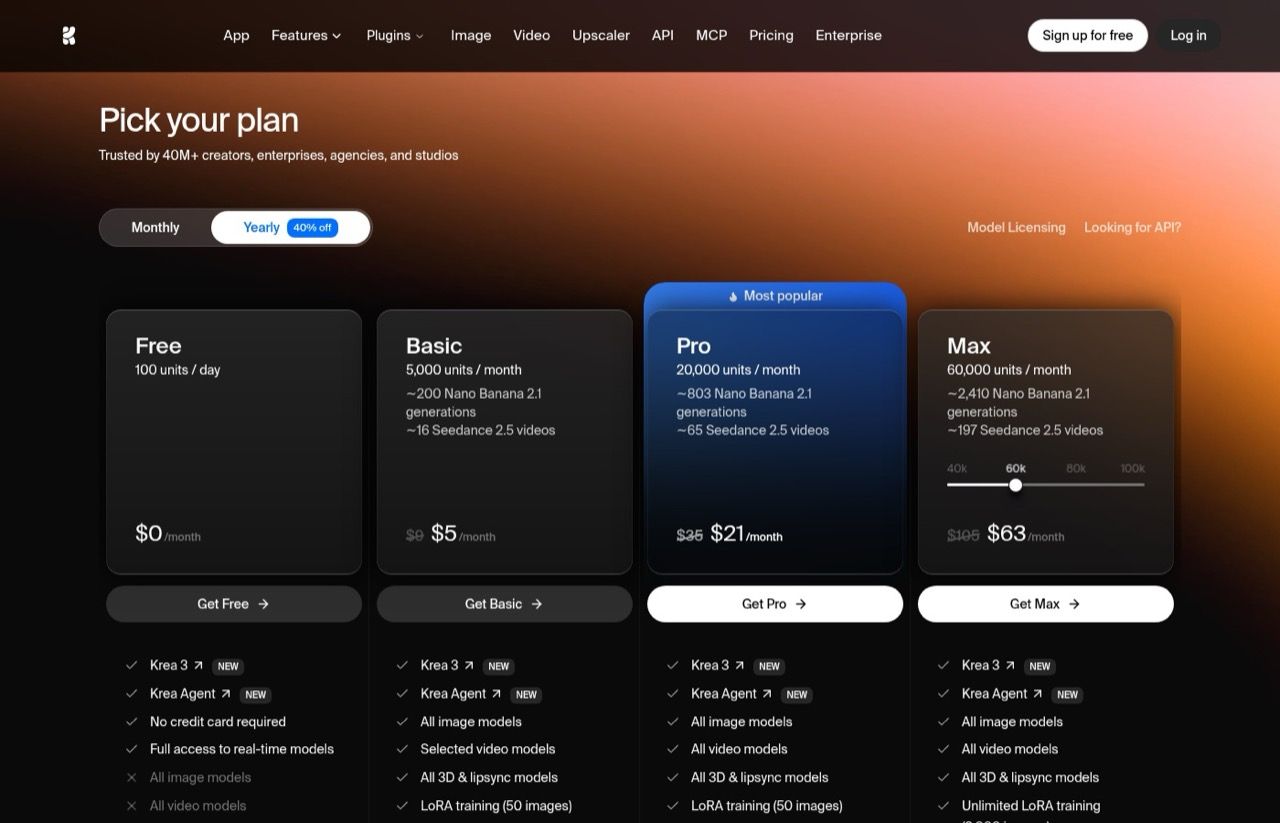
Krea is the pick for creators who want many image and video models in one app. It covers image generation, video, upscaling and custom training, and every plan runs on a monthly allowance of compute units. I've used it, and it's the easiest way on this list to try several video models without juggling accounts.
Check what a plan buys before you pick one. Krea's Pro card says about 65 Seedance 2.5 videos, but its own pricing breakdown puts a 5-second 720p clip at 856 units, or about 23 on Pro. If you were looking at Higgsfield for the same job, my Higgsfield alternatives breakdown covers why I'd pick a different route.
Basic is $9 a month and Pro is $35 on monthly billing, and the free plan gives you 100 units a day.
If short-form clipping is the part of your workflow you are trying to fix, I went deeper on the options in my Opus Clip alternatives breakdown.
Ryan's Final Thoughts
No single tool on this list does everything. That is the point. The creators winning in 2026 run a stack where each tool handles what it does best. Blotato covers repurposing and scheduling. Opus Clip handles short-form clipping. Descript handles editing. ElevenLabs handles voice. They work together, not in isolation. The layer most stacks are missing is the writing step between the recording and the scheduler.
Start with the tool that solves your biggest bottleneck right now. Distribution is the problem? Start with Blotato, and my social media automation tools breakdown covers the alternatives. Editing is eating your time? Start with Descript or Opus Clip. Building a video-first strategy? HeyGen or Runway belongs in the workflow, and I walk through the full pipeline in my guide to making AI video with Claude Code. For a look at how these fit into a broader system, check out my breakdown of an AI agent for content creation and my full AI marketing stack.
The tools are good. The strategy behind how you use them is what separates real results from a subscription graveyard.
Best AI Tools for Content Creators FAQs
What is the best AI tool for content creators in 2026?
It depends on your biggest bottleneck. Blotato is the best all-in-one option for repurposing and scheduling content across platforms. If video editing is your pain point, Descript or Opus Clip are stronger picks. There is no single best tool because the best stack is the one that covers your specific workflow gaps.
Can AI tools replace a content team?
Not entirely, but they get you surprisingly close as a solo creator. Tools like Blotato, HeyGen, and ElevenLabs let one person handle content at a volume that previously required a team. The strategy and creative direction still need a human. The execution can be largely automated.
Which AI tools are best for YouTube creators?
Opus Clip for turning long videos into short-form clips, and it can now be run from inside an AI agent instead of its dashboard. Descript for editing without a traditional timeline. Midjourney for custom thumbnails. ElevenLabs for voiceovers if you want to batch produce content without recording every video. Blotato for turning your YouTube content into a full week of social posts automatically.
Are free AI content creation tools worth using?
The free tiers on tools like Opus Clip, ElevenLabs, and Descript are genuinely useful for testing, but they are intentionally limited. Most serious creators will hit the cap within a few weeks. Think of free tiers as a real trial, not a long-term operating model.
Disclosure: the Blotato and Blaze AI links in this post are affiliate links, and I may earn a commission at no extra cost to you. Blotato is also a client of mine, and my account there is comped. I have used Blotato, Opus Clip, Blaze and Poppy, and the other tools are covered from their own sites, with third-party sources for Midjourney's prices. Full disclosure.