
Is Grok Bot Worth It? (Rate Limits & Workarounds)
Whether Grok Bot is worth it comes down to one thing nobody puts in the demo videos. It runs out of weekly usage faster than almost anyone expects, and the fix is a machine you are already paying for and probably never opened.
What Grok Bot Actually Is
Aaron Makelky paid full price for Grok Bot the week it launched, back when the cheapest door was $200 a month. Nobody sponsored him and nobody gave him a discount code.
He came on the podcast to walk through what he actually got for it, where the limits stop him, and the part of the subscription almost nobody opens.
That matters, because he came on AI Rabbit Holes with the unglamorous version of this product rather than the demo version. Entry has since fallen to $20, and his verdict barely moved.
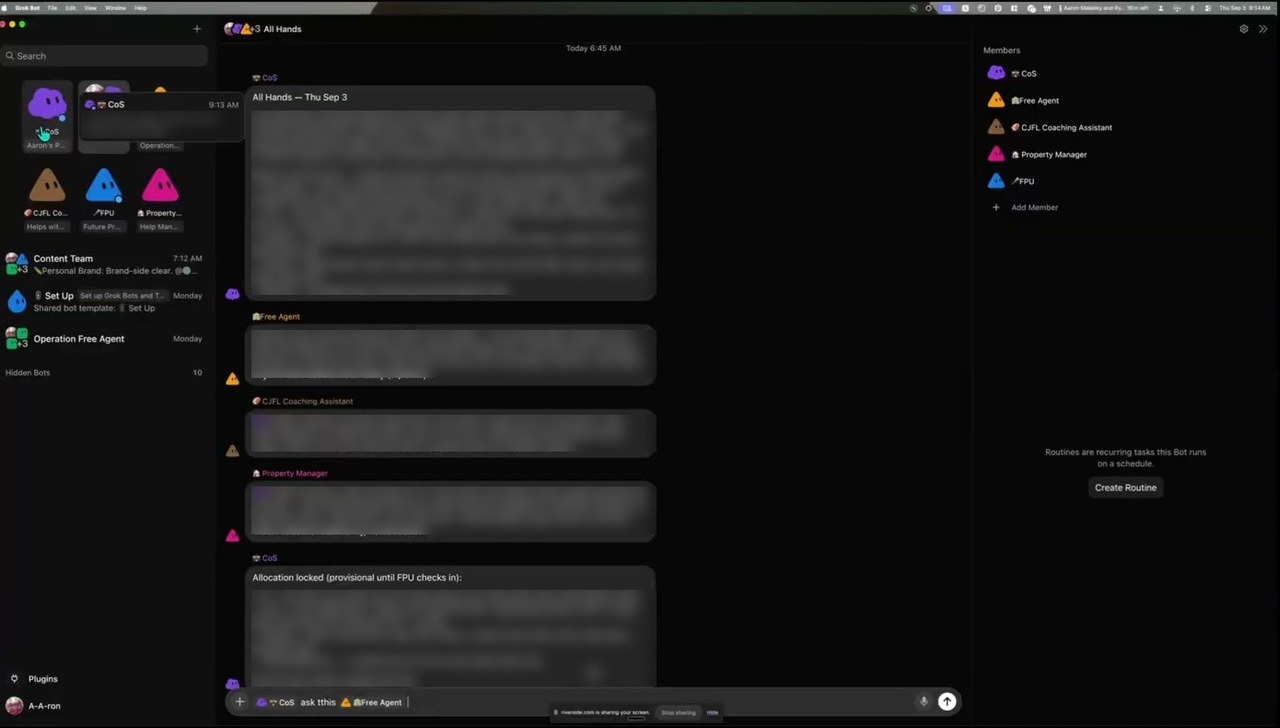
Imagine Slack, except none of your colleagues are human. You get a sidebar of AI bots, you drop them into channels, and you hand them jobs.
Each bot is a non-human employee working a task or collaborating with another bot. It is single player, but it feels multiplayer.
The part that earned the attention is where it runs. There is no Mac mini to buy, no VPS to rent, no config file to babysit.
It runs in the cloud on xAI's own machine, with apps for macOS, Windows, Linux, iPhone, and Android. Aaron runs it across macOS, iPhone, and Linux, and turning off every device he owns does not stop it. That is the real tradeoff against driving your own machine remotely, which is how I run ChatGPT on a Mac Mini from my phone, where a sleeping Mac does stop the session.
Want to build systems like this without the subscription? My Claude Code Skills Stack gives you the skill files I run my own business on.
The Grok Bot Rate Limit Workaround Nobody Advertises
Your subscription includes a cloud virtual machine, and unlike other hosted agent products, you can click into it and drive it yourself.
You get a browser you control and a terminal you can type into. Codex, Cursor Agent, Antigravity, and Grok CLI all run on it.
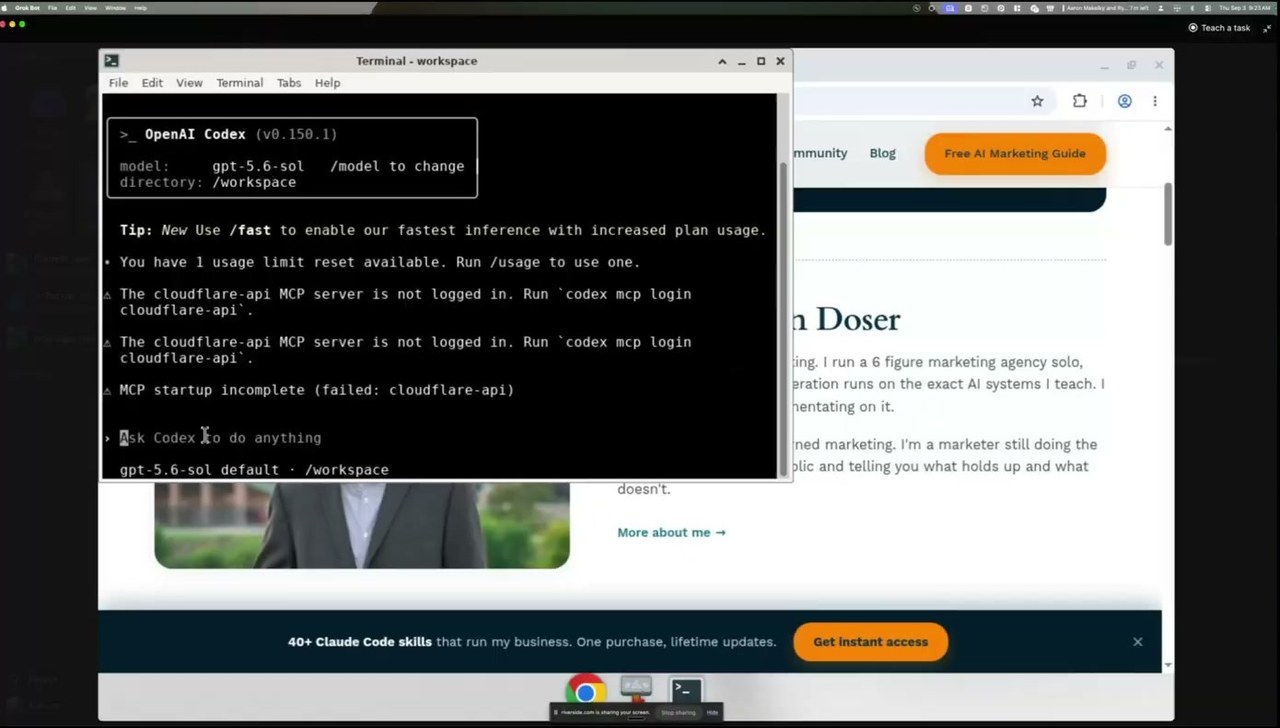
That detail is also the rate-limit workaround. Grok Bot stays in charge and hands the actual coding job to an agent running in that terminal, which draws on that agent's usage instead.
Aaron walks through the whole thing in under three minutes here.
He is direct about what this is not. Grok Bot still spends its own allowance on prompting and orchestration, so the trick stretches the limit rather than removing it.
Watch the ceiling too. Once a weekly allowance is gone, usage spills onto your account's on-demand spend, and there is no Grok Bot specific cap to stop it.
Aaron enforces the split with standing instructions on his top-level bot. It handles the conversation between the other bots, but any actual building happens in the VM terminal.
He pushed it further than most, putting the machine on his Tailscale network behind an exit node. It browses as if it were sitting in his house, moves files straight to his laptop, and prints his schedule on his home printer each morning. That is a box in a data center driving hardware in his office.
Now put that against the price. On the $40 Teams tier, Grok Bot is one of three things you are paying for.
Cursor's cloud agents and Grok CLI in the terminal are the other two, and Aaron rates both higher. He calls Grok CLI the best command-line tool available right now, and it has no desktop app yet, so almost nobody who bought the bundle has tried it.
Most buyers use only the first of the three, hit a wall, and conclude the product is broken.
The Naming Problem That Costs People Money
Aaron kept circling back to the reason people feel cheated. Cursor, Grok, and Grok Bot are three different products with nearly the same name.
In his experience they do not spend from one shared bucket. You can exhaust Grok Bot for two days, open the Grok app running the same underlying model, and keep working.
Read the fine print before you build a budget on that. Cursor's own documentation states that Grok Bot usage is metered on your Cursor account rather than on Grok or X, and that linking a SuperGrok or X Premium+ subscription grants usage on that same account instead of creating a second meter.
So the vendor describes one meter where a heavy user describes separate ceilings. Treat the documentation as the thing that governs your bill and Aaron's experience as the thing that governs your afternoon.
The lesson survives the disagreement either way. People buy this thinking they bought one product, use a third of what they paid for, and call the whole thing a scam.
The Price Drop Changed the Number, Not the Verdict
Those launch-day doors were a $200 Cursor Ultra plan or a $300 SuperGrok Heavy plan. Cursor's pricing page now lists Grok Bot access on Individual Pro at $20 a month, with bigger allowances on Pro+ at $60 and Ultra at $200.
Teams Standard runs $40 per user. xAI's August 26 announcement is the one that opened it up, confirming Grok Bot is included with all SuperGrok, Cursor Pro, and Cursor Teams plans.
Check that date against anything you read elsewhere. xAI's own FAQ page still lists a narrower set of eligible plans that starts at Cursor Pro+, so the cheapest door is easy to miss.
So the sticker price fell by roughly 90%, and cheap entry makes the limits bite sooner rather than later.
On the highest tier available, Aaron still hits weekly limits. His words: "I don't know anybody, even for personal stuff, that could go beyond moderate usage right now."
There is also no free tier to fall back on. Cursor's own documentation describes the trial as a usage credit with a 7-day window, not an ongoing free plan.
That credit runs out on the entry tiers before you finish setting up a system worth running, which is why Aaron calls the free-access marketing "a little bit deceiving."
Who Grok Bot Is Actually For
Aaron sorts the agent market into a pyramid.
At the top sit the roughly 0.1% who are true developers and love to hack on things, and that group runs OpenClaw. Below them, about 5%, are people comfortable in a terminal who want to control their setup, which is Hermes territory.
Everyone else is the actual market. They want more than a texting agent but they are never opening a config file.
Grok Bot is built for that third group, and if you are stuck deciding between chat, cowork, code, and a desktop app, this is where it does its best work. Connecting a tool means clicking a sign-in box inside the chat, not pasting an API key into a config file.
Aaron connected a personal Gmail and a work Gmail that way, and each one took a click. If you are still deciding which assistant to commit to at all, my breakdown of which Claude model to use covers the same decision on the Anthropic side.
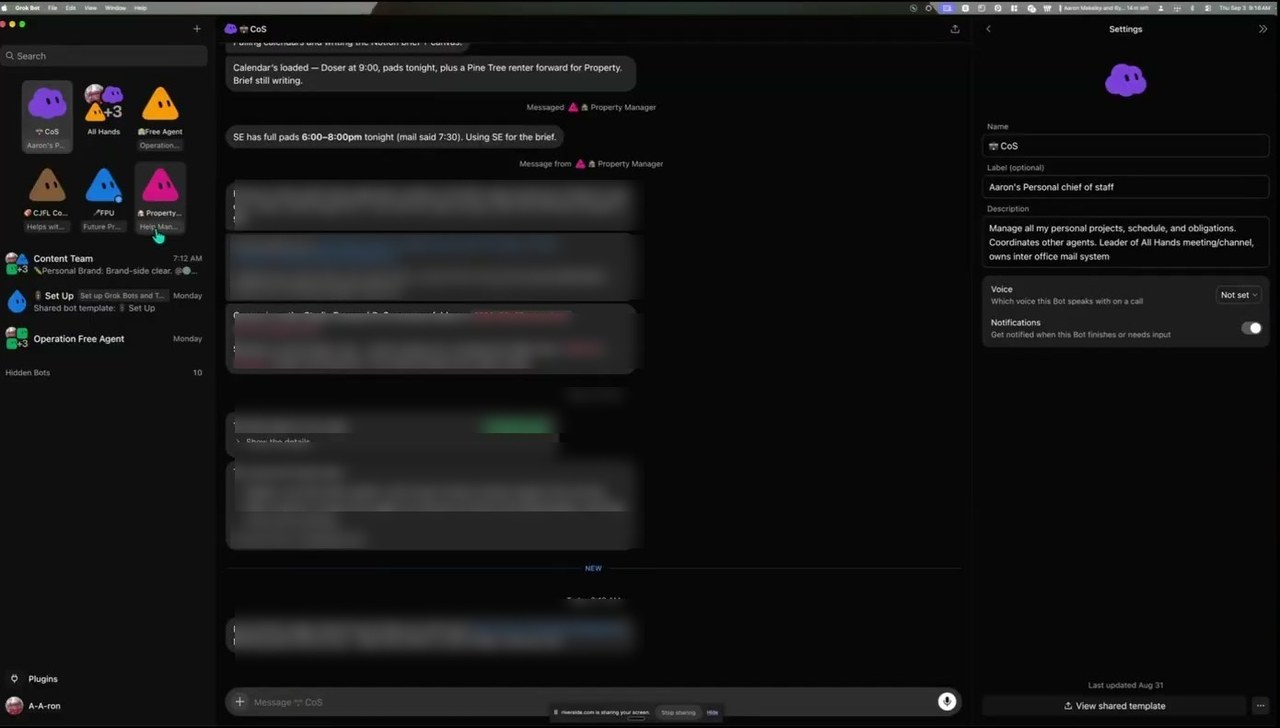
He hates the term best practices for a tool that has existed a few weeks, so he says be intentional instead.
Shape and color carry meaning in his sidebar. The Chief of Staff is the only purple cloud, project managers are triangles, and single-job specialist bots stay hidden.
He messages a manager, and the manager delegates down to the worker bots. It works the way middle management works.
What That Looks Like on Real Work
The example he showed is one I know the manual version of, because it is this podcast. He hands a recording to his bots and asks them to lay the intro and outro music, move the ad read to a specific spot, and publish it.
They pull the right track, find the right project in Descript, write the show notes and the timestamps, and push the episode to Transistor. He puts the finished work at about 95% and still listens before anything ships.
One rule of his is worth copying. His bots may draft anything and send nothing.
A draft can sit in his Gmail, but no message or post leaves his ecosystem without him. That is the right default for any agent holding your logins.
Where the Lock-In Hurts
Here is the part that would keep me away. You are locked inside the xAI model ecosystem with no way out.
You cannot call an OpenAI model, an Anthropic model, or an open-source one. That much you might expect from a first-party product.
The frustrating part is narrower. You cannot even choose between xAI's own models.
You cannot see which model is running and you cannot change it. Right now it is Grok 4.6, but whether it is the fast variant and what thinking level it uses are both invisible.
That breaks a habit anyone managing usage builds early. Running your heaviest model for every task burns limits fast, so you delegate the small jobs to a cheaper one.
None of that is possible inside Grok Bot, which makes the rate limits worse than they need to be. The one thing that would stretch a quota is the one control the product withholds.
For the non-technical majority this is a feature, not a flaw. My problem with the trade is that it is permanent, because every other agent tool I run lets me start simple and take the controls later.
Will Grok Bot Still Matter Next Year
Aaron says yes, with a catch that undercuts the yes. Grok Bot was the first agent product he saw handle multiple Gmail connectors cleanly, and a competitor shipped the same feature within about five days.
Copying now moves faster than filming and publishing a video about the new thing. My own read is harsher, and twelve months out it would surprise me if this still matters.
The deeper problem is who xAI sells to. Cursor's brand was built for developers, there is no Cursor for marketers or for sales, and by Aaron's estimate the overwhelming majority of users are coders connecting to GitHub.
Consider Where You Are Reading the Hype
There is a reason the sentiment you see skews positive, and it has nothing to do with the product. xAI owns X, so the loudest venue for Grok Bot opinion is a channel the manufacturer controls.
The same pressure exists where I publish. If I wanted a video to travel on YouTube, the cynical play would be covering Antigravity, because Google owns both the tool and the algorithm deciding who sees the video.
That is an incentive worth naming, not an accusation that anyone rigged a feed. Read any verdict on Grok Bot, including this one, knowing who benefits from it.
Aaron's answer to the noise is the useful one. He seeks out the people posting that they are stuck and rate-limited, because troubleshooting from real users beats a demo where everything works.
My Honest Verdict on Grok Bot
If you already live in Claude Code or Codex, tune this out. It will not do your work, and Aaron said so plainly.
The exception is narrow. Remote sessions on Claude and Codex can be fussy, so a simple interface while you are away from your desk has some pull.
If you are not technical and you manage a real digital footprint, a podcast, a site, a channel, this is the most approachable agent product available. A busy family juggling calendars fits too.
For collaborative teamwork, no. Each user gets an isolated machine and cannot reach anyone else's, so Aaron's single-player description holds even on Teams plans.
Aaron's closing principle is the one worth keeping regardless. Be model agnostic and be tool agnostic.
He keeps his skills backed up in GitHub rather than trapped inside whichever tool he is using. Build your agent team so you can port it out when you cancel, because you will cancel something eventually.
That is why I keep my own workflows in Claude Code for marketing work rather than a vendor's walled garden.
The tool changes. The system should survive it.
You can follow Aaron at aaronmakelky.com or on X, where he posts practical Grok Bot troubleshooting rather than hype.
Grok Bot FAQs
How much does Grok Bot cost?
Grok Bot access starts at $20 a month through Cursor's Individual Pro plan, with bigger allowances on Pro+ at $60 and Ultra at $200. Cursor Teams Standard is $40 per user per month, and SuperGrok plans also qualify. At launch the only doors were roughly $200 to $300 a month, so the entry price has fallen sharply since then.
Is Grok Bot free?
No. Grok Bot has no free tier and requires a paid Cursor plan or a linked SuperGrok or X Premium+ subscription. Cursor's documentation describes the trial as a usage credit with a 7-day window rather than an ongoing free plan, so the credit can run out before you finish setting anything up. Budget for a subscription rather than planning around free access.
How do you get around Grok Bot's rate limits?
Use the cloud virtual machine that comes with your subscription. Aaron's approach is to keep the conversation in Grok Bot and run the actual building through coding agents in the VM terminal, which in his testing drew on usage separate from his Grok Bot allowance. Cursor does document the ceiling: once a weekly allowance is gone, usage continues on your account's shared on-demand spend, and no Grok Bot specific cap is published.
What is the difference between Cursor, Grok, and Grok Bot?
They are three different products sold under nearly the same name, which is the single biggest source of buyer confusion. Cursor is the coding environment, Grok is xAI's chat assistant and model family, and Grok Bot is the agent workspace where you run a team of bots. Aaron's experience is that running out in Grok Bot does not stop you using the Grok app on the same model, while Cursor's documentation states that Grok Bot usage is metered on your Cursor account rather than on Grok or X, and that linking SuperGrok or X Premium+ does not create a second meter. Treat the documentation as the thing that governs your bill and the day-to-day behavior as the thing that governs your afternoon.
Is Grok Bot better than Claude Code or Codex?
Not for daily work, and not for anyone already comfortable in those tools. Grok Bot wins on simplicity and on running in the cloud without setup. Claude Code and Codex win on model choice, control, and cost per unit of work. See Who Grok Bot Is Actually For above for the full breakdown.
Does Grok Bot work for teams?
Only in a limited sense. Teams plans give each person their own seat, but xAI's documentation states each user's work runs in a dedicated microVM and that one user cannot reach another user's computer. Colleagues do not share a workspace or each other's bots, which is what Aaron means by single player. Combined with rate limits, that rules out most collaborative business use.