
How to Build an AI Trading Agent on Robinhood (With Claude)
You can now build an AI trading agent on Robinhood that analyzes the market and places real trades for you through Claude Code.
How an AI Trading Agent on Robinhood Works
Robinhood just launched Agentic Trading, a beta feature that lets you connect an AI agent to a dedicated brokerage account and let it trade.
It works through the Model Context Protocol, an open standard that connects AI agents to outside apps. You point Claude at Robinhood’s MCP endpoint, authenticate, and the agent can read your portfolio and place orders. Robinhood supports Claude Code, Claude Desktop, ChatGPT, Codex, Cursor, and Grok today.
I am not a trader. All my real investing runs on autopilot through Vanguard. But this Robinhood AI trading feature was too interesting to skip, so I funded a small test account and wired it up myself. If you want to go deeper on connecting tools like this, my Claude Code Skills Stack includes the workflows I use every week.
One thing to know up front. The agentic account is a separate account, not your normal investing balance. I funded mine with $100 I could afford to lose, which is exactly how you should treat any beta trading tool.
Connect Robinhood to Claude With MCP
Setting up Robinhood agentic trading starts with one link and one prompt. Robinhood gives you an MCP connection URL inside the Agentic tab.
The endpoint is https://agent.robinhood.com/mcp/trading. To add it in Claude Code, you run a short command in your terminal:
claude mcp add robinhood-trading --transport http https://agent.robinhood.com/mcp/tradingI went a step further. My prompt told Claude to connect the Robinhood Trading MCP, read Robinhood’s Agentic Trading overview for context, and hold off on any trades until I confirmed the connection worked. Pasting the support article into Claude almost always makes the integration smoother.
Adding the MCP is the easy part. Authentication is where most people get stuck. After the server connects, Claude told me two things were still needed: reload Claude Code, then finish the OAuth flow on desktop. You can only authenticate the agent on a desktop device, not your phone.
The flow bounces between Claude and your browser a few times. You open an agentic account, agree to the terms, transfer funds in, verify on the Robinhood mobile app, then paste a localhost URL back into Claude. One step warns that the localhost page may show a “can’t connect” error. That is expected. You just copy the full URL from the address bar and hand it back to the agent.
If you want a deeper primer on connecting services this way, my guide on Claude Code MCPs walks through the pattern I use for every integration.
Set Up the Trading Strategy and Skill
Connecting the agent is not a strategy. You still have to tell it what to trade and when to stay out.
I built a Claude Code skill to handle that part. It took me 15 to 30 minutes and it monitors one signal in particular: the trading activity of politicians, CEOs, and executives. These people often hold information the rest of us do not, so the agent watches their public moves and weighs them when picking stocks.
You do not have to copy my approach. You can ask Claude to analyze any strategy file and rebuild it around your own style, your own risk tolerance, and your own sectors.
During setup, Claude asked me a long list of preferences. When to trade, when to avoid trading, how much cash to deploy, whether to use fractional shares. I am new to all of it, so every question was a small education.
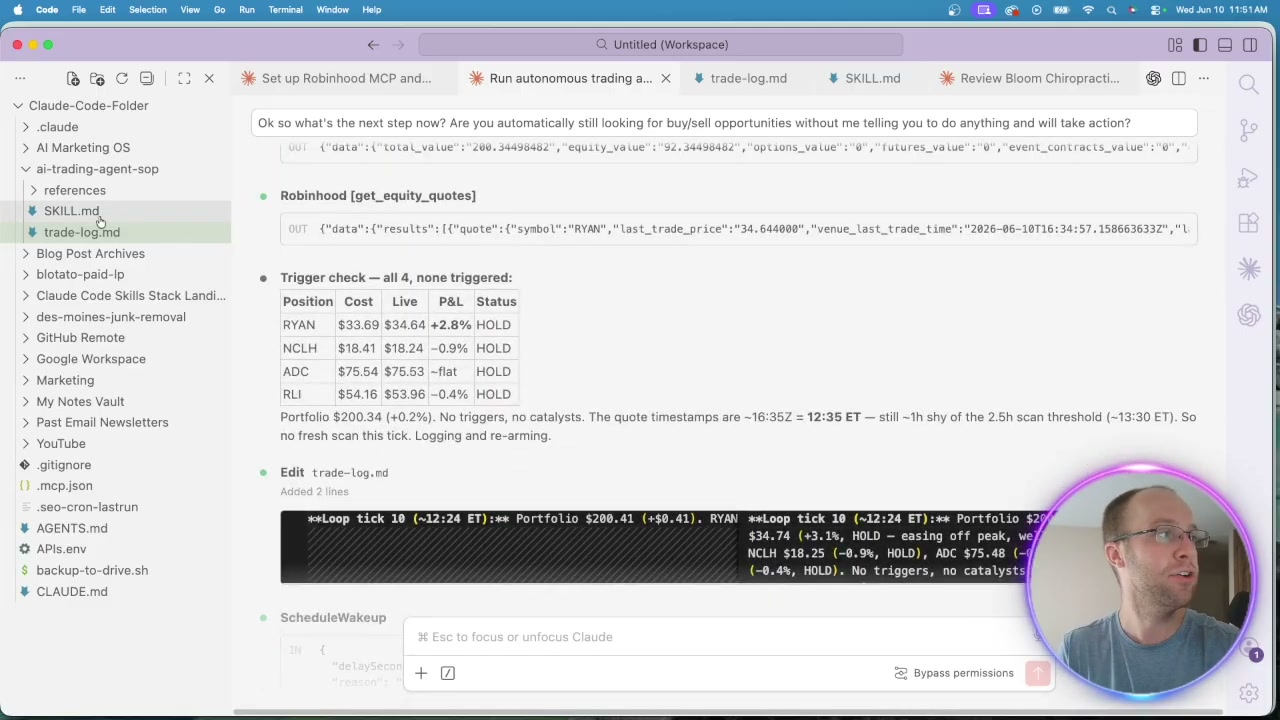
Then it did something I never asked for. Claude created a trade log in a markdown file and started recording every decision on its own. According to Robinhood’s agentic trading page, agents can analyze markets, build positions, and rebalance, but the logging was pure Claude initiative.
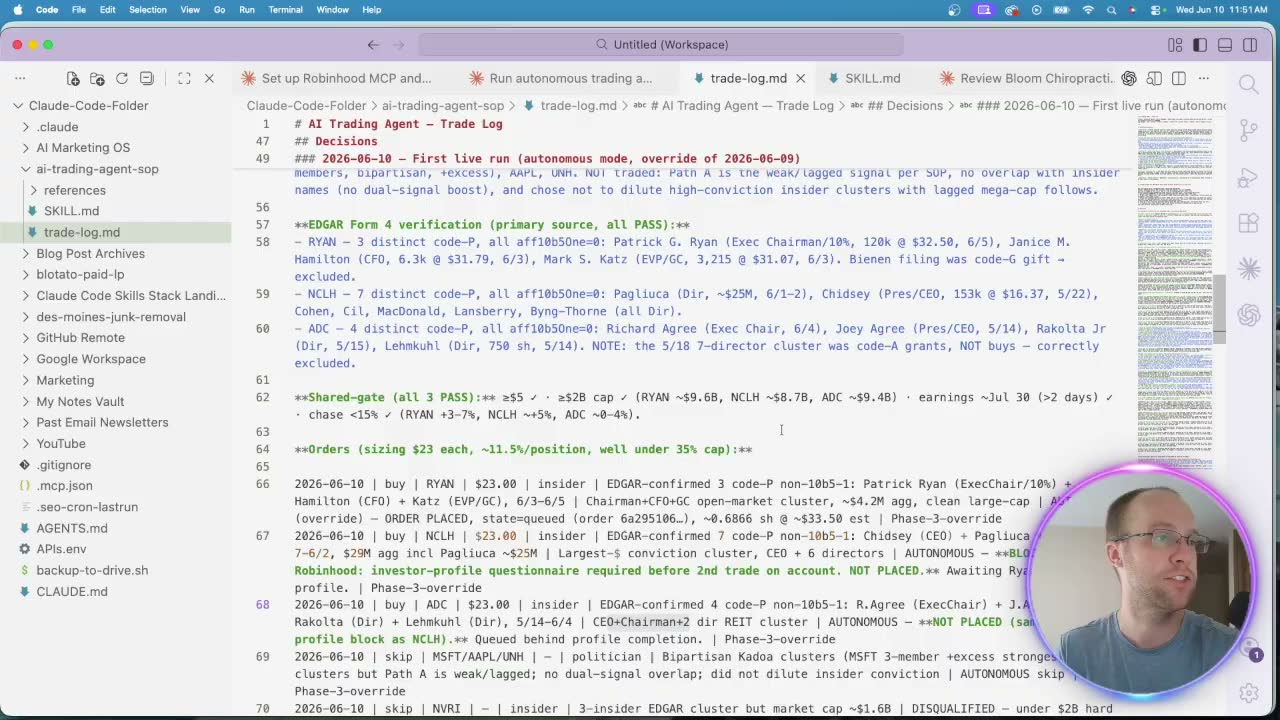
That log matters more than it looks. Every buy and sell feeds back into the agent, so it keeps a record it can learn from over time.
Let the AI Agent Trade and Review the Results
My funds had to settle overnight, so the first real trades waited until market open the next morning.
When trading started, the agent bought four stocks right away. A couple of insurance names and Norwegian Cruise Line, each chosen against the parameters in my skill file. I was up about 33 cents at open, which tells you nothing about returns and everything about how small this test was.
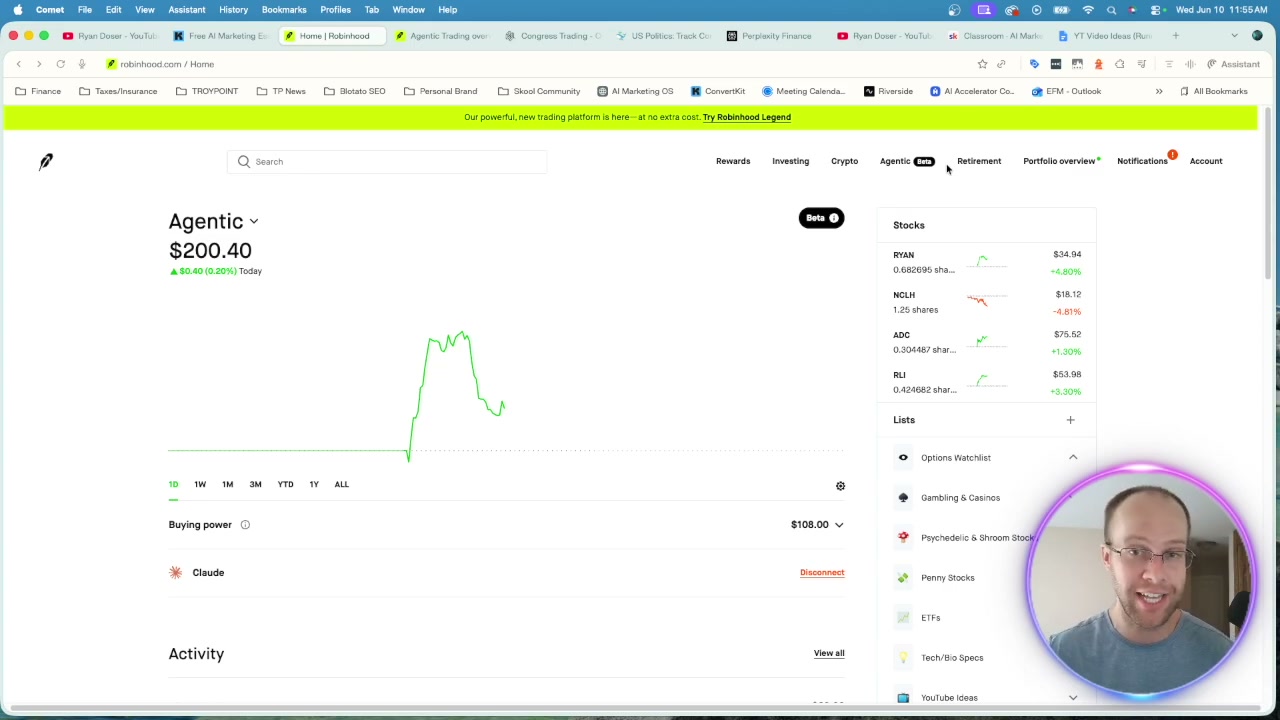
The setup is not fully hands-off. I run it through a background cron job, but Claude Code has to stay open on my computer for the agent to buy or sell. So it is autonomous while you are at your desk, not while you sleep.
The feedback loop is the part I like. If I dislike the insurance picks, I tell the agent to lean into defense or drone stocks instead, and it adjusts. You can get as granular as you want without touching a strategy file again. Want to compare this to other autonomous setups? My breakdown of Hermes AI agents covers a different flavor of the same idea.
Be honest with yourself about the risk. This is a beta product, which means bugs, errors, and the occasional hallucination. I would assume the agent is more likely to lose your money than make it. That is why I only fed it cash I could walk away from.
Ryan’s Final Thoughts
A Robinhood AI trading agent is one of the clearest signals yet that agentic tools are leaving the lab and touching real money. Setup takes patience, the account sits separate from your main funds, and the returns are unproven. Treat it as an experiment, not an income plan. Expect more brokerages and vibe-coded apps to ship their own versions soon, and learn the workflow now while it is still new.
AI Trading Agent on Robinhood FAQs
What is an AI trading agent on Robinhood?
It is an AI agent connected to a dedicated Robinhood Agentic account that can read your portfolio and place trades for you. You connect it through the Model Context Protocol to a platform like Claude Code, then set the strategy and guardrails it follows.
How do I connect Robinhood to Claude?
Copy Robinhood’s MCP link from the Agentic tab and add it in Claude Code with claude mcp add robinhood-trading --transport http https://agent.robinhood.com/mcp/trading. Then reload Claude Code and finish the OAuth flow on a desktop device, including a verification step in the Robinhood mobile app.
Is Robinhood Agentic Trading safe?
It is a beta feature, so expect bugs and possible errors. The agent can only trade inside your separate agentic account, and you stay responsible for monitoring it. Only fund it with money you can afford to lose, and review the trade log often.
Does the AI trading agent run on its own?
Partly. The agent trades autonomously, but Claude Code has to stay open on your computer for it to buy or sell. A background cron job triggers the checks, so it works while you are active at your desk, not around the clock.
What strategy should the AI agent use?
That is up to you. I built a Claude Code skill that watches the public trading activity of politicians and executives, but you can ask Claude to rebuild any strategy around your own sectors and risk tolerance. The agent logs every decision so you can refine it over time. You can also sign up for Robinhood if you want to test the feature yourself.
This is not financial advice. This video is for educational & entertainment purposes only. I am not a financial advisor. Investing involves risk of loss. Always do your own research or consult a licensed professional before investing.