
How to Automate Content Marketing Workflows with AI
Posts built from my YouTube videos earned about 70% of my Google clicks from February 23 to October 13, 2026, and that's why I automate content marketing around video. Content marketing automation is a set of saved AI workflows that handle the repeat work, like turning one recording into a blog post and an email, then spotting which published pages need a refresh.
How to Automate Content Marketing in 5 Steps
Cassie Clark had me back on episode 109 of the Found in AI podcast to show how I automate content marketing as a one-person agency. Here's the conversation, then the five steps.
- Record one long-form video a week that answers questions your buyers ask. A recorded webinar works too, and recorded sales calls tell you which questions to answer.
- Move out of the chat window. Run Claude Code and Codex in one workspace (I use VS Code) where they can read your files and use your tools.
- Build a slash command that turns a published video URL into a blog post, a promo email and a diagram. Plan on several rounds of fixes before the output is good.
- Read every draft before it goes live. The workflow handles structure, links and images, and your subject knowledge decides what's good.
- Connect Google Search Console through a read-only MCP, ask for the pages that lost clicks or impressions in the last 28 days, approve the fixes and let Claude Code push them to your site.
If you'd rather start from working files than a blank page, my Claude Code Skills Stack holds the skills I run for my own marketing.
About 70% of My Google Clicks Started as a YouTube Video
This is the slide I used to show why I automate content marketing around video. On ryandoser.com, posts built from my own YouTube videos earned 70.4% of Google clicks from February 23 to October 13, 2026, or 8,855 of 12,584 clicks in Search Console page data.
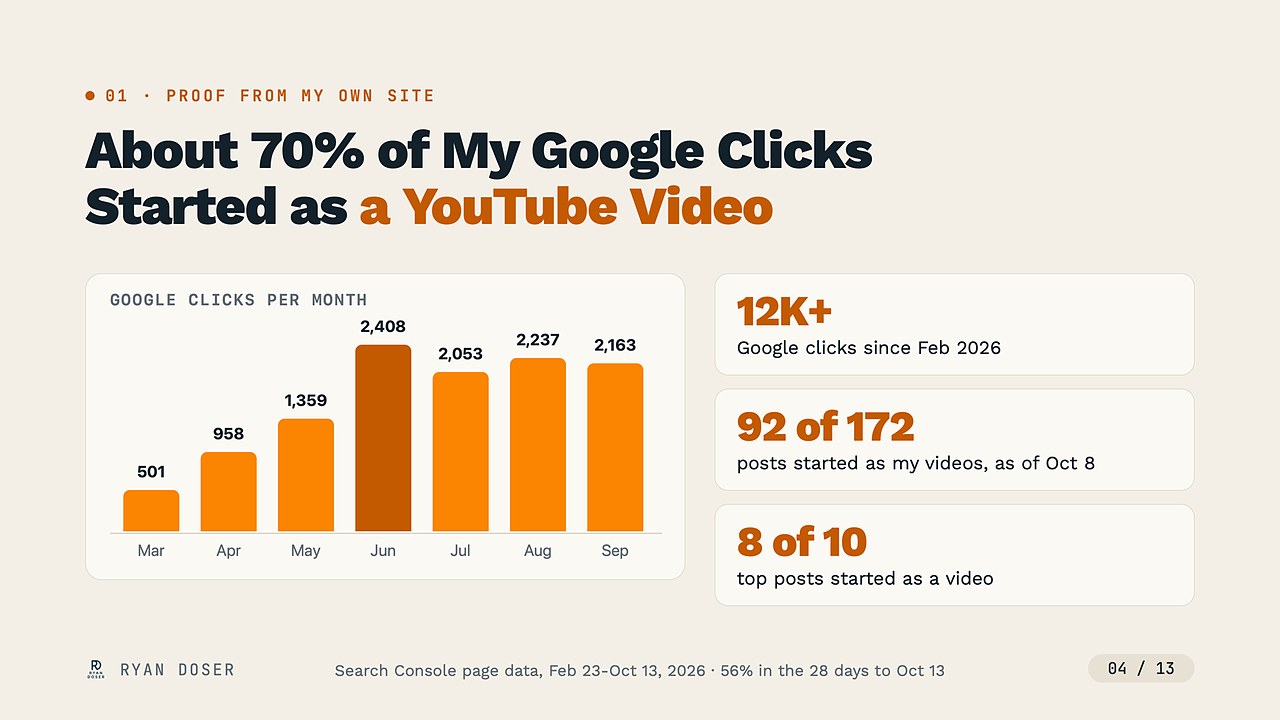
Eight of my top 10 blog posts by clicks started as a video. That's why the video stays the one original asset I make by hand.
The recent numbers are weaker. In the 28 days to October 13, the share fell to 56% and total clicks were flat to down, and my read is that I repurposed fewer videos in that stretch.
My videos also target topics people already search for, so these posts start with demand built in. Repurposing a video nobody searches for won't copy these numbers.
Cassie's "how long ago?" came while she read my Search Console Generative AI performance report, which showed 147K impressions on its 12-month view the morning we recorded (October 16).
My answer was that I started repurposing before Google added that report in June 2026. The report counts impressions in AI Overviews and AI Mode, not clicks.
Get Out of Copy-Paste Mode to Automate Content Marketing
Most people using AI are still stuck in copy-paste mode. They bounce between chatgpt.com, claude.ai and Gemini, pasting output from one browser window into another.
That's where I started too, and all it does is move the typing between windows. To automate content marketing, you need one workspace where the AI can open your files, run your tools and save the result.
Mine is VS Code with Claude Code and Codex side by side.
As I told Cassie, "it's not this Claude Code versus Codex conversation. That's the wrong mentality," and I explain the split in my post on using Claude Code and Codex together.
For context, I'm a non-technical marketer who didn't use VS Code until the start of 2026. Think of it as a friendlier wrapper around a terminal.
What One Slash Command Does to Automate Content Marketing
A slash command is a saved workflow you trigger by typing a forward slash and its name. My /podcast-guest-slides command built the deck I presented on the episode in about five minutes.
For video, /yt-repurpose is the command I lean on most. Once a video is live, I give it the URL and it returns the whole package.
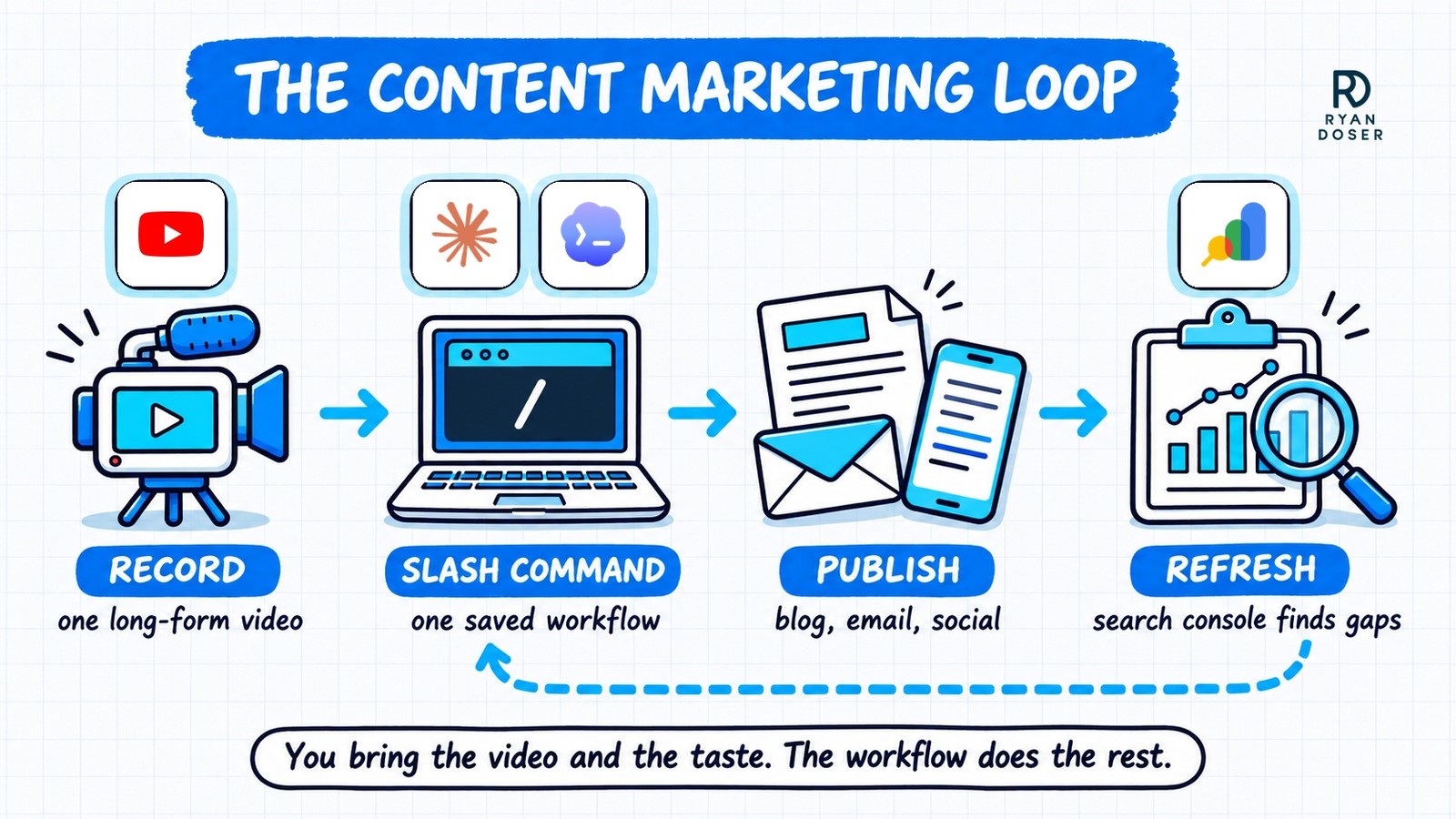
Here's what one run produces:
- A blog post with an H1 close to the video title, the target keyword in an H2, the embedded video, internal and external links, screenshots from the video and FAQs
- An on-brand diagram that Codex draws, with official logos added in code
- A promo email in Kit with the same diagram, a link to the video and a link back to the post
- A LinkedIn and X post built around that same diagram, plus two text-only X posts
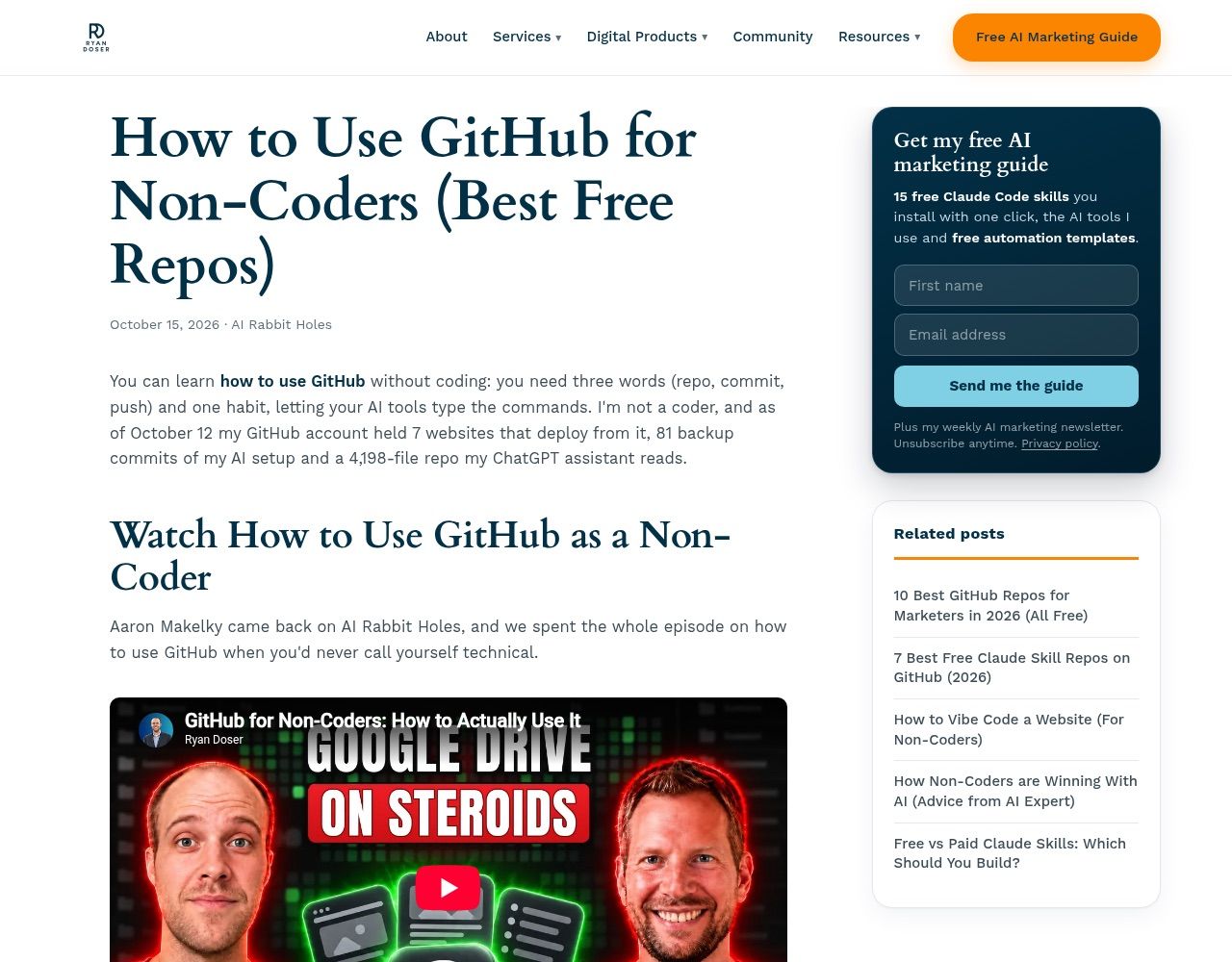
I walked Cassie through my GitHub for non-coders post live, since it was the newest run. One command run produces all of that.
On the call I called it hands-off, and the generation is. Every draft still gets a Codex check and my own read before it ships.
To build your own, ask Claude Code to create a slash command and list the steps and skills it should run. Or, at the end of a chat that went well, tell it to save that task as a slash command.
Anthropic has since folded custom commands into skills, and older command files keep working. The setup for the blog half lives in my Claude Code YouTube repurposing guide.
How I Use a Google Search Console MCP to Refresh Posts
Fixing posts as they slip is the step most people who automate content marketing skip. It used to mean comparing three-month windows in Search Console, then editing page by page in WordPress.
Now Claude Code reads my Search Console data through a community-built Search Console MCP (model context protocol) server that I keep read-only. A prompt close to the one I described on the call does the comparison:
Pull up my Google Search Console MCP and find the
opportunity gaps from the past 28 days where I lost
clicks or impressions in AI search results.
Then give me the updates.
Claude Code returns a list of proposed edits. Once I've read them, I tell it to make those changes, and it edits the posts and pushes them live.
One caveat on the AI part of that prompt: Google's Search Console API doesn't expose the Generative AI report yet, so an API-based MCP sees total clicks and impressions. The AI-only numbers stay inside Search Console itself.
That last step works because my site runs on Astro, GitHub and Cloudflare, so every edit is a file change that a push publishes. Setup for the connection is in my guide to connecting MCPs in Claude Code.
WordPress isn't dead, and I said so on the episode. A bigger team with editors and writers can keep its CMS, but as I told Cassie, it should still use a WordPress MCP instead of editing posts by hand.
For a solo marketer, a small agency or a local business, I'd skip the CMS. My WordPress alternative post covers the Astro setup I use instead.
According to the episode notes, Cassie put my advice into practice, migrating her own site and updating more than 100 pages with Codex.
How Much Does It Cost to Automate Content Marketing?
Cassie asked for a ballpark, and on the call I said "4 to 500 bucks a month probably." Itemized, my core tools come closer to $350 a month, and most of that is two AI plans.
| Tool | Job in the workflow | What I pay (October 2026) |
|---|---|---|
| Claude Code (Max 20x, now called Ultra) | Builds and runs the slash commands | $200/mo |
| Codex (ChatGPT Pro, entry tier) | Second agent that checks the work | $100/mo |
| DataForSEO | Keyword and SERP data | $50 minimum top-up, lasts me 2-3 months |
| Search Console MCP | Reads clicks and impressions | $0 |
| Astro, GitHub, Cloudflare | Site framework, code storage, hosting | $0 on free plans |
| OpenRouter | Other AI models through one API key | About $25 to $30/mo, pay per use |
When we recorded, my $200 Claude plan was called Max 20x. Anthropic has since renamed it Ultra at the same price, and on Claude's pricing page today, Max means the $100 tier.
Starting out, you don't need either top plan. Claude Pro is $20 a month and ChatGPT Plus, also $20, includes Codex, so about $40 a month covers both agents, per each vendor's pricing page in November 2026.
These are snapshots, so check each vendor for today's rate. For transparency, I also pay $5 a month for Cloudflare's Workers plan because I run several sites, and you don't need it.
Where Automated Content Marketing Breaks
Cassie asked how long one slash command took to set up, and I gave her the honest answer: "It's not like you can just set up one slash command and go and you're going to get the best outputs possible."
My podcast commands probably took five to 10 iterations each before the output was good. The upside is that fixes carry forward: tell Claude what was wrong and to update the command, and the next run starts from the fix.
The second limit is taste. As Cassie put it, if you skip the human element, "what you're putting out is just AI slop."
You need enough subject matter expertise to know what good looks like for each task, and you still read the draft. When you automate content marketing, the workflow saves the formatting and the busywork, not the judgment.
Record Once, Review, Then Let the Loop Run
Start with your next video and one command that drafts the blog post. Once that runs clean, add the email, then the Search Console refresh.
That order is how I'd automate content marketing again from scratch: the video and the review stay yours, and the loop handles everything between them.
Automate Content Marketing FAQs
Can you automate content marketing without knowing how to code?
Yes. Claude Code writes and runs the code, and it's included in every paid Claude plan, so a non-technical marketer can start on Claude Pro. Your job is describing the workflow in plain English, saving it as a slash command (Anthropic now stores these as skills), and correcting it after each run until the output matches what you'd publish yourself.
How much does it cost to automate content marketing with AI?
About $40 a month gets you started: Claude Pro and ChatGPT Plus at $20 each, as of November 2026, with Search Console, Astro, GitHub and Cloudflare on free plans. My own setup comes closer to $350 a month itemized, because I pay for Claude's $200 plan and ChatGPT Pro at $100, plus DataForSEO and OpenRouter usage.
What if I don't make YouTube videos?
Use the long-form content you already make. Cassie suggested webinars on the episode, and I added sales calls: record and transcribe them, then mine them for the questions your buyers ask. Turn those questions into a weekly podcast or video, and your repurposing workflow has a steady source without you inventing topics from scratch.
Is automated content marketing just AI slop?
It is if you publish one-prompt drafts without reading them. In my workflow, Codex checks the Claude Code draft before I see it, so two AI models from different companies and one human review every post. The source matters too: a long-form video on a subject you know gives the AI original material instead of a rehash of other articles.